Tag: Business Websites

  • Core Web Vitals for Business Websites: What They Measure, What Breaks Them, and What to Fix First

    Core Web Vitals for Business Websites: What They Measure, What Breaks Them, and What to Fix First

    Core Web Vitals for business websites come down to one question: does the page let a visitor become an enquiry without friction? A business website has one job that matters more than the rest: turning a visitor into an enquiry. Everything that slows that down, a hero image that takes four seconds to appear, a form that freezes when someone taps it, a button that jumps just as they go to click it, costs you leads before anyone reads a word of your copy.

    Google has a way of measuring exactly those three failures. They are a ranking signal, but for most businesses the bigger cost of failing them isn’t the ranking. It’s the visitor you paid to bring in who leaves before the page is usable.

    This guide explains what the three metrics measure in 2026, what typically breaks them on business websites, and the order we fix them in when we take over a slow site.

    Quick answer: To pass Core Web Vitals in 2026, a page needs Largest Contentful Paint (LCP) at or under 2.5 seconds, Interaction to Next Paint (INP) at or under 200 milliseconds, and Cumulative Layout Shift (CLS) at or under 0.1, measured at the 75th percentile of real Chrome visitors over a rolling 28-day window. Mobile and desktop are assessed separately.

    What are Core Web Vitals?

    Core Web Vitals are three field metrics that describe how a page feels to a real person: how quickly the main content appears, how quickly the page reacts to input, and whether the layout stays still while it loads.

    MetricWhat it measuresGoodNeeds improvementPoorWhat the visitor experiences
    LCP (Largest Contentful Paint)Loading: when the largest visible element, usually the hero image or headline, finishes rendering≤ 2.5 s2.5–4 s> 4 s“Is this page even loading?”
    INP (Interaction to Next Paint)Responsiveness: the delay between a tap, click or keypress and the next visual update, across the whole visit≤ 200 ms200–500 ms> 500 ms“I tapped the button and nothing happened.”
    CLS (Cumulative Layout Shift)Visual stability: how much content moves unexpectedly while the page loads≤ 0.10.1–0.25> 0.25“I clicked the wrong thing because the page jumped.”

    INP replaced First Input Delay (FID) as the responsiveness metric in March 2024. That change matters for business sites: FID only measured the first interaction, so a site could pass while its enquiry form, menu or filter felt sluggish. INP looks at interactions across the whole visit, which is why many sites that were “green” in 2023 started failing.

    The thresholds themselves have been stable since then. What changed recently is reach: LCP and INP are now measurable in all major browsers, not just Chrome, so the same numbers you see in Google’s tools can be collected from your Safari and Firefox visitors too.
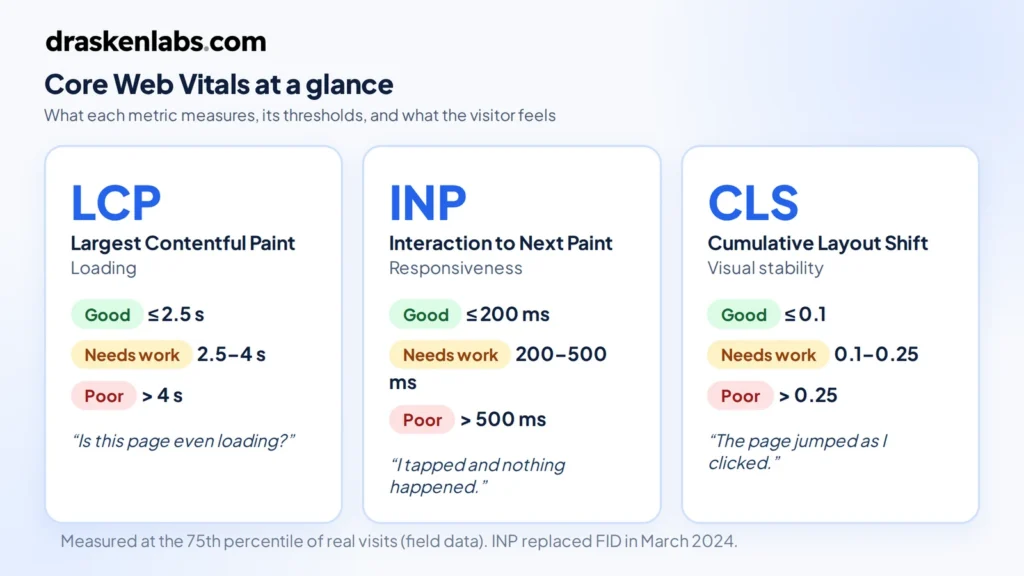
    Core Web Vitals thresholds: LCP 2.5 s, INP 200 ms and CLS 0.1, with what each problem feels like to a visitor
    The three metrics, their thresholds, and what a visitor experiences when each one fails.

    Why Core Web Vitals matter for a business website

    Rankings: a tiebreaker, not a shortcut

    These metrics are part of Google’s page experience signals. Be realistic about their weight: relevance and content quality still decide most rankings. Where they matter is when your service page and a competitor’s are otherwise close. In local and B2B service searches, that’s common, because most pages targeting “website development company in Delhi” or “cloud consultant Dubai” say roughly the same thing.

    Conversions: where the real money is

    Speed and stability affect whether people act. The best-documented example is Vodafone Italy’s A/B test, published on web.dev, where improving LCP by 31% on otherwise identical landing pages produced 8% more sales. For a business website, the equivalent is enquiries, calls and booked consultations.

    Paid traffic: you pay for every bounce

    If you run Google or Meta ads to a landing page, every visitor who leaves before the page renders is a click you paid for and got nothing from. Slow landing pages quietly inflate your cost per lead.

    Your 75th-percentile visitor is not on your laptop

    Google grades you on the experience of the slower end of your real audience. For businesses selling into India, the UAE or Southeast Asia, that visitor is often on a mid-range Android phone on a mobile network. A page that feels instant on office Wi-Fi can still fail.

    Field data vs lab data: the mistake most businesses make

    The most common conversation we have goes like this: “Our developer showed us a Lighthouse score of 95, but Search Console says our pages are failing.” Both can be true.

    • Lab data (Lighthouse, the lab section of PageSpeed Insights) is a single simulated page load on a simulated device. It’s excellent for diagnosing problems and cannot tell you whether you pass.
    • Field data (the Chrome User Experience Report, shown in Search Console and at the top of PageSpeed Insights) is what real visitors experienced over the last 28 days. This is what Google uses.

    Lab tests also can’t measure INP properly, because INP depends on real people clicking real things. A perfect lab score with a heavy chat widget that only loads after interaction will still fail in the field.

    If your site doesn’t get enough traffic to have field data in Search Console, you have two options: use lab tests as a proxy, or collect your own real-user monitoring (RUM) data with the open-source web-vitals library. If you send RUM data into your own metrics stack, tag it by page template (home, service, blog post) rather than by full URL. Per-URL labels are one of the fastest ways to blow up your observability bill with high-cardinality metrics. Setting this up properly is part of what our observability service covers.
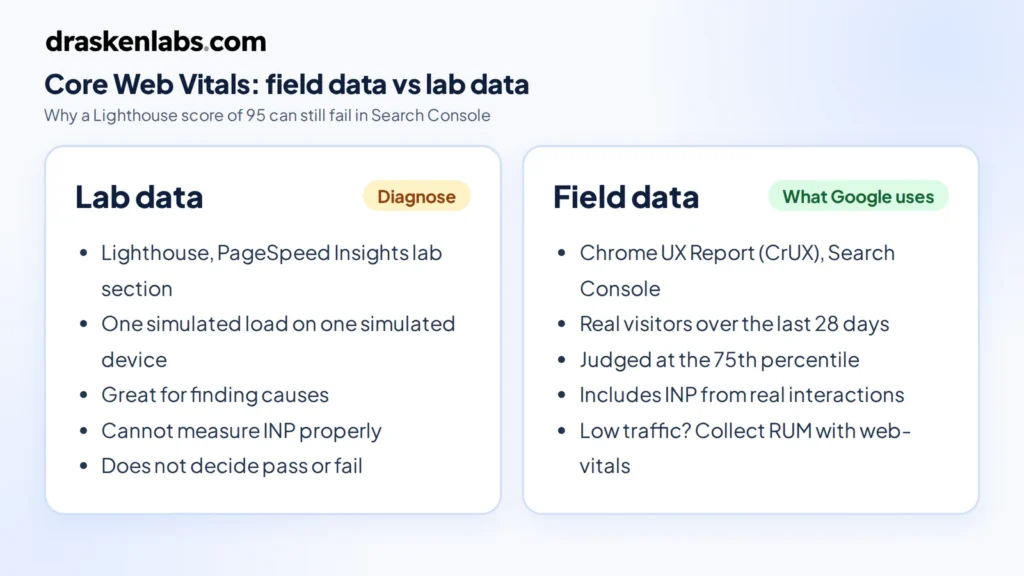
    Core Web Vitals field data vs lab data: Lighthouse diagnoses problems, CrUX field data decides pass or fail
    Lab data finds the cause; field data decides whether you pass.

    How to check your own site in five minutes

    1. Open PageSpeed Insights, paste your homepage URL and run the test.
    2. Read the top section first, “Discover what your real users are experiencing”. That is field data. If it says “Passed” for mobile, your homepage passes; the Lighthouse score underneath is only a diagnostic.
    3. Switch between the Mobile and Desktop tabs. Mobile is where most business sites fail.
    4. Repeat for one service page and your main landing page, since those templates usually differ from the homepage.
    5. In Search Console, open Experience → Core Web Vitals to see which groups of URLs are failing and on which metric.

    That gives you a clear, evidence-based picture of where you stand before you spend anything on fixes, and a baseline to compare against once changes go live.

    What usually breaks Core Web Vitals on business websites

    After auditing a lot of company sites, the causes are remarkably consistent. It’s rarely one big problem; it’s a pile of small, reasonable-sounding additions.
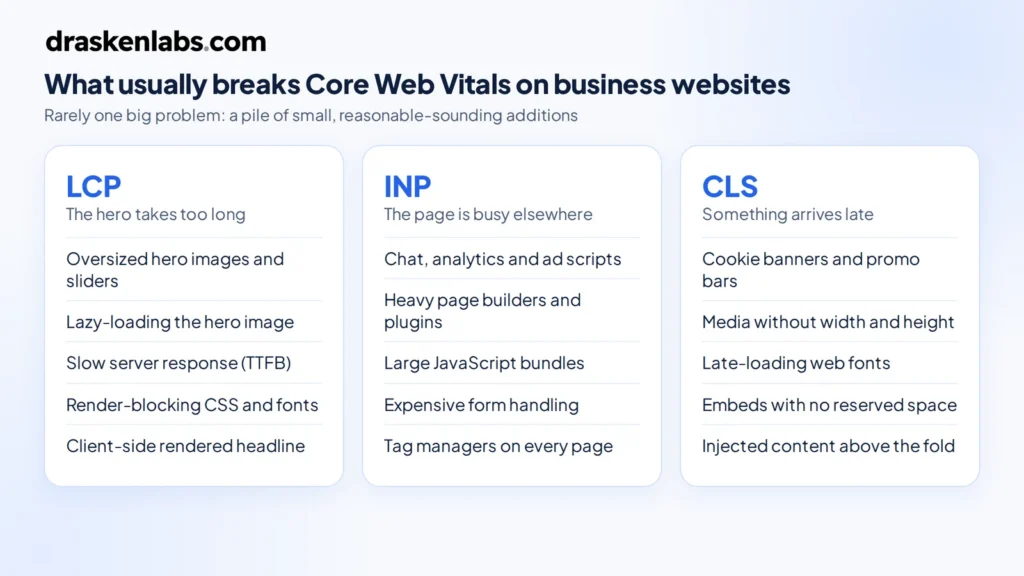
    What breaks Core Web Vitals on business websites: causes of poor LCP, INP and CLS
    The most common causes of poor LCP, INP and CLS on business websites.

    LCP problems: the hero takes too long

    • Oversized hero images or sliders. A 3 MB banner exported straight from a design tool, or a five-slide carousel where every slide loads upfront.
    • Lazy-loading the hero. Lazy loading is right for images below the fold and wrong for the one image that defines LCP.
    • Slow server response. Shared hosting, no page caching, or a CMS that builds every page on every request pushes Time to First Byte up, and LCP can’t start until the HTML arrives.
    • Render-blocking CSS and fonts. Several font families, each in multiple weights, loaded before anything can paint.
    • Client-side rendering of the hero. If the headline only appears after a JavaScript bundle downloads and runs, LCP waits for all of it.

    INP problems: the page is busy doing something else

    • Third-party scripts. Chat widgets, analytics, ad pixels, heatmaps, A/B testing tools and tag managers all compete for the same main thread your visitor’s tap needs.
    • Heavy page builders and plugin stacks. Each plugin adds its own JavaScript, often on every page whether it’s used or not.
    • Large JavaScript bundles. Especially on sites that ship an entire app framework to render what is mostly static marketing content.
    • Expensive form handling. Validation libraries, address autocomplete and CRM scripts that run long tasks on every keystroke.

    CLS problems: something arrives late and pushes everything down

    • Cookie banners and promo bars injected at the top of the page after it renders.
    • Images, videos and iframes without dimensions, so the browser doesn’t know how much space to reserve.
    • Web fonts swapping with very different metrics from the fallback font, reflowing every line of text.
    • Embeds such as Google Maps, YouTube, review widgets and social feeds that resize themselves once loaded.

    The fix order we use on business websites

    Fixing these metrics goes faster when you work in the right order. This is the sequence we follow.

    1. Measure by page template, not by page. Search Console groups similar URLs. Your service pages likely share one template; fix the template and you fix them all.
    2. Start with the pages that make money. Homepage, service pages and paid landing pages come before the blog archive.
    3. Fix whichever metric is in the “poor” band first. Moving a metric from poor to needs-improvement usually takes less effort than pushing an amber metric to green.
    4. Audit third-party scripts. Every script should have an owner and a reason. Remove the ones nobody can justify, delay the rest until after the page is interactive, and load chat widgets on intent (a click on a chat button) rather than on page load.
    5. Fix LCP. Serve the hero image in a modern format at the right size, don’t lazy-load it, give it high fetch priority, cache pages at the edge with a CDN, and pre-render marketing pages rather than building them per request.
    6. Fix CLS. Set width and height on media, reserve space for banners and embeds, and use font fallbacks with matched metrics.
    7. Fix INP. Break up long JavaScript tasks, defer non-essential work, and replace heavy components with lighter ones. INP is usually the hardest of the three, so budget time for it.
    8. Stop it regressing. Add a performance budget to your deployment pipeline so a new plugin or a 4 MB image fails the build instead of reaching production. This is standard work in our platform engineering engagements.
    9. Wait for the data. Field data is a 28-day rolling window. Expect to wait around four weeks before Search Console fully reflects a fix.
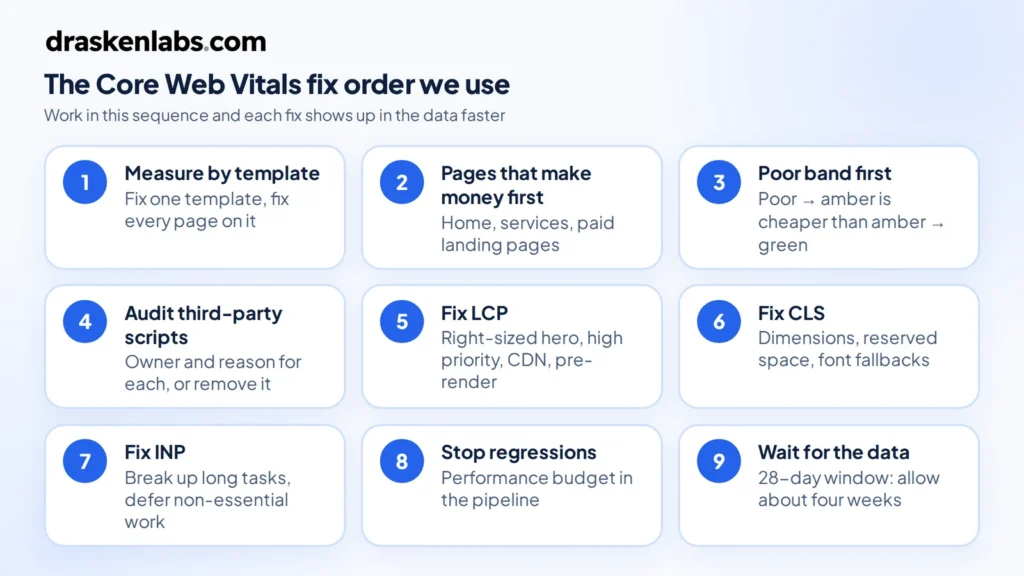
    Core Web Vitals fix order in nine steps, from measuring by template to waiting for 28 days of field data
    The nine-step fix order, from measuring by template to waiting for field data.

    Hosting and platform choices that affect LCP, INP and CLS

    There is no platform that passes or fails these metrics by default. We’ve seen fast WordPress sites and slow custom React sites. What matters is how the site is built and served.

    • WordPress can pass comfortably with a lean theme, disciplined plugin use and full-page caching. It struggles when a heavy page builder and 30 plugins are all loading on every page.
    • Headless or static setups (for example a Next.js frontend with WordPress as the CMS, which is what our own site runs on) make fast LCP easier because pages are pre-rendered, but they can still fail INP if the frontend ships too much JavaScript.
    • Hosting matters mostly through server response time and caching. A CDN in front of a well-configured server fixes more LCP problems than moving to more complex infrastructure. A marketing website almost certainly doesn’t need Kubernetes, and serving static assets from a CDN is also one of the easier ways to cut cloud costs. If you want this handled end to end, see our cloud and DevOps service.

    If your website includes logged-in areas such as customer dashboards or portals, INP becomes a software engineering problem rather than a website tweak. That’s the point where it helps to treat the site as an application, which we cover in our guide to custom software development services.

    Questions to ask your web developer or agency

    You don’t need to understand every technical detail to hold your website partner accountable. Ask these:

    • Do our key templates pass all three metrics in field data, on mobile and desktop?
    • Which third-party scripts load on our pages, and who decided each one was needed?
    • Is the hero image lazy-loaded? What format and size is it served in?
    • Are pages cached and served from a CDN?
    • What stops a new plugin or image from making the site slower after launch?
    • How will we know if performance regresses before Google does?

    If the answers are vague, performance probably wasn’t part of the brief. That’s worth knowing when you’re comparing quotes, because performance work is one of the real differences between a cheap site and a professional one, as we explain in how much a professional business website costs in 2026.

    How Drasken Labs builds for Core Web Vitals

    We treat Core Web Vitals for business websites as a requirement from the start of a project, not an audit item after launch. In our website development projects that means choosing a rendering approach that suits the content, setting image and script budgets before design sign-off, reserving layout space for every component that loads late, and wiring real-user monitoring into production so we see a regression before it shows up in Search Console. You can see examples of the sites we build in our recent website work.

    Is your website failing LCP, INP or CLS?

    Send us the URL. We’ll tell you which metric is failing, on which templates, and what it would take to fix, whether that’s a focused performance pass or a rebuild.

    Get a Core Web Vitals review from Drasken Labs →

    Sources and further reading

    Are Core Web Vitals a Google ranking factor?

    Yes. They are part of Google’s page experience signals. Content relevance and quality still matter more, so Core Web Vitals tend to act as a tiebreaker between pages that are otherwise similar.

    If my Lighthouse score is 100, do I pass Core Web Vitals?

    Not necessarily. Lighthouse is a lab test on a simulated device. Google assesses Core Web Vitals using field data from real Chrome visitors. Check the Core Web Vitals report in Search Console or the field-data section of PageSpeed Insights.

    How long does it take for fixes to show in Search Console?

    Field data uses a rolling 28-day window, so expect roughly four weeks before a fix is fully reflected. You can use the “Validate fix” option in Search Console to start tracking it.

    Why does Search Console show no Core Web Vitals data for my site?

    Your pages probably don’t have enough real Chrome traffic to be included in the Chrome User Experience Report. Use lab tools for diagnosis and consider collecting your own real-user data with the web-vitals library.

    Can a WordPress website pass Core Web Vitals?

    Yes. WordPress sites pass regularly when they use a lightweight theme, a small set of plugins, page caching and a CDN. Heavy page builders and large plugin stacks are the usual reasons they fail.

    What replaced First Input Delay (FID)?

    Interaction to Next Paint (INP) replaced FID as a Core Web Vital in March 2024. INP measures responsiveness across all interactions during a visit, not just the first one.

    Which Core Web Vital should I fix first?

    Fix whichever metric is in the “poor” band on your most valuable page templates first. After that, LCP usually has the most direct effect on leads, and INP usually takes the most engineering effort.

  • How Much Does a Professional Business Website Cost in 2026?

    How Much Does a Professional Business Website Cost in 2026?

    A professional business website can cost anywhere from a few hundred dollars to tens of thousands of dollars, depending on what you need the website to accomplish.

    In 2026, businesses are no longer building websites simply to have an online presence. A modern business website may need to generate leads, rank in search engines, integrate with a CRM, support marketing campaigns, load quickly, work across devices, and provide a foundation for future digital products.

    As a result, the question is not simply “How much does a website cost?” but rather:

    “What kind of website does my business actually need?”

    For planning purposes, typical website development budgets can look like this:

    Website typeTypical 2026 budget
    Basic/template business website$500–$2,000
    Professional business website$2,000–$7,500
    Custom business website$5,000–$15,000+
    Advanced website/web platform$15,000–$50,000+

    These are general planning ranges rather than fixed market prices. The actual cost depends on the website’s design, functionality, content, integrations, technology, SEO requirements, and development scope.

    What Determines the Cost of a Professional Business Website?

    Two websites can have the same number of pages and completely different development costs.

    A five-page website using an existing template may take considerably less work than a five-page website with custom UX, animations, integrations, technical SEO, a CMS, analytics, and custom backend functionality.

    Here are the major factors that influence the price.

    1. Website size and complexity

    The number of pages is one factor, but it isn’t the most important one.

    A simple company website might contain:

    • Home
    • About
    • Services
    • Case Studies
    • Contact

    A larger website might include:

    • Multiple service categories
    • Industry pages
    • Location pages
    • Blog/resource center
    • Case studies
    • Careers
    • Knowledge base
    • Customer portal
    • Product pages

    More pages generally mean more content, design and development work. However, the complexity of each page matters just as much as the page count.

    2. Design and user experience

    A template-based website can be relatively inexpensive because much of the visual structure already exists.

    A custom-designed website requires more work.

    The process may involve:

    • User research
    • Information architecture
    • Wireframes
    • UX design
    • Visual design
    • Responsive layouts
    • Design systems
    • Interactive elements
    • Conversion optimization

    For businesses competing in crowded markets, the website often needs to communicate credibility within seconds. This makes UX and visual design an important part of the overall investment.

    3. Custom development

    A website can range from a collection of CMS pages to a custom software system.

    For example, a marketing website may only require a CMS and contact forms.

    A more sophisticated website might require:

    • Custom APIs
    • User authentication
    • Customer dashboards
    • Database functionality
    • CRM integration
    • Payment processing
    • Booking systems
    • Third-party APIs
    • Automated workflows

    Once a website starts handling business logic, it moves beyond conventional web design and becomes a software development project.

    4. Content creation

    Website development and website content are related, but they are not always the same service.

    A professional website may require:

    • Website copywriting
    • Service descriptions
    • Product descriptions
    • Case studies
    • Blog content
    • Photography
    • Illustrations
    • Videos
    • Infographics

    If the development team is also responsible for producing or restructuring the content, the project scope increases.

    5. Search engine optimization

    SEO should not be treated as something that is added after a website has been developed.

    A search-friendly website needs an appropriate architecture from the beginning.

    This can include:

    • Search-friendly URLs
    • Logical information architecture
    • Internal linking
    • Metadata
    • Structured data
    • Semantic HTML
    • Indexability
    • Mobile responsiveness
    • Performance optimization
    • Image optimization
    • Content structure

    Technical SEO is therefore one of the factors that can affect website development cost.

    6. Integrations

    Modern business websites frequently need to communicate with other systems.

    Examples include:

    • CRM systems
    • Email marketing platforms
    • Payment gateways
    • Analytics platforms
    • Marketing automation tools
    • Customer support systems
    • ERP systems
    • Booking platforms
    • WhatsApp integrations
    • Internal business APIs

    A simple contact form is relatively straightforward.

    Synchronizing leads between a website, CRM and marketing automation system is a different level of development.

    7. Performance, security and scalability

    A professional website also needs to work reliably after launch.

    Depending on the project, development may include:

    • Performance optimization
    • Caching
    • Image optimization
    • Security configuration
    • Form protection
    • Access control
    • Backup strategy
    • Monitoring
    • Error tracking
    • Scalable hosting architecture

    These requirements may not be visible to visitors, but they contribute significantly to the quality of the finished system.


    Website Development Cost by Type

    Not every business needs the same type of website.

    Basic business website: $500–$2,000

    A basic website is generally appropriate for businesses that primarily need an online presence.

    It may include:

    • A pre-built theme or template
    • A small number of pages
    • Responsive design
    • Contact form
    • Basic CMS
    • Basic analytics
    • Basic SEO configuration

    This approach keeps the initial investment low, but customization and advanced functionality may be limited.

    Professional business website: $2,000–$7,500

    A professional business website is designed around the company’s brand, audience and business objectives.

    It may include:

    • Custom or heavily customized design
    • Conversion-focused page structure
    • Responsive UI
    • CMS
    • SEO-ready architecture
    • Analytics
    • Lead-generation forms
    • Performance optimization
    • Third-party integrations
    • Professional content structure

    This is often the range businesses consider when the website is an important part of their marketing and sales operation.

    Custom business website: $5,000–$15,000+

    A custom website goes further than a conventional marketing website.

    It may involve:

    • Fully custom UI/UX
    • Custom frontend development
    • Custom backend functionality
    • API integrations
    • CRM integrations
    • Advanced content management
    • Customer portals
    • Custom workflows
    • Advanced SEO architecture

    The exact price depends heavily on the technical requirements.

    Advanced web platform: $15,000–$50,000+

    At this level, you’re often building a software product rather than simply a company website.

    Examples include:

    • SaaS platforms
    • Customer portals
    • Membership platforms
    • Complex e-commerce systems
    • Marketplace platforms
    • Booking platforms
    • Data dashboards
    • Enterprise web applications

    These projects require considerably more planning, engineering, testing and ongoing maintenance.


    What Should a Professional Business Website Include in 2026?

    A professional website should do more than look good.

    At a minimum, businesses should consider the following.

    Responsive design

    The website should provide a usable experience across:

    • Desktop
    • Laptop
    • Tablet
    • Mobile

    Clear conversion paths

    Visitors should understand what to do next.

    Depending on the business, this could mean:

    • Request a quote
    • Book a consultation
    • Call the company
    • Submit an inquiry
    • Request a demo
    • Purchase a product
    • Download a resource

    SEO-ready architecture

    The website should provide a solid technical foundation for organic search.

    Analytics

    Businesses should be able to understand:

    • Where visitors come from
    • Which pages they visit
    • Which campaigns generate traffic
    • Where users convert
    • Which pages need improvement

    Content management

    For businesses that regularly publish content, a CMS can make it easier for internal teams to update the website without requiring developers for every change.

    Security

    Forms, authentication, APIs and administrative functionality should be appropriately protected.

    Performance

    A professional website should be designed with page speed and efficient delivery in mind.

    Scalability

    The architecture should account for what happens when the company adds:

    • More services
    • More content
    • New integrations
    • New markets
    • New functionality

    Cheap Website vs. Professional Website

    The difference between a low-cost website and a professional website is not simply the number on the invoice.

    It is usually the amount of work behind the website.

    AreaLow-cost approachProfessional approach
    DesignTemplate-basedCustom or strategically customized
    UXBasicDesigned around user journeys
    ContentCustomer-providedStructured and optimized
    SEOBasic setupConsidered throughout architecture
    PerformanceVariableDeliberately optimized
    IntegrationsLimitedCustom integrations where required
    ScalabilityOften limitedPlanned around future requirements
    AnalyticsBasicConnected to business goals
    SupportVariesDefined development/support process

    A low-cost website isn’t necessarily the wrong choice.

    If your business only needs a simple online presence, spending tens of thousands of dollars may not make sense.

    The important question is whether the website’s capabilities match the business requirement.


    How Much Should a Business Budget for a Website?

    Instead of choosing a budget based purely on the number of pages, start with the business objective.

    A new or small business

    If the primary goal is establishing an online presence and generating basic inquiries, a budget around $1,500–$4,000 may be appropriate depending on the scope.

    An established small or medium-sized business

    If the website is an important lead-generation and marketing channel, a budget around $3,000–$10,000 can provide room for better design, content structure, SEO, integrations and conversion optimization.

    A B2B or technology company

    Companies selling higher-value services or software may require a more sophisticated website.

    A budget of $5,000–$15,000+ may be appropriate when the project includes custom design, technical SEO, integrations and more extensive content architecture.

    A company building a web application

    Once the website includes authentication, dashboards, databases, payments, complex workflows or substantial business logic, it should be budgeted as a software project.

    These projects can start around $15,000 and increase substantially depending on scope.


    How Much Does Website Development Cost in India?

    India has a broad website development market, ranging from individual freelancers and small teams to established software development companies.

    Consequently, there is no single “Indian website development price.”

    You may find:

    • Very low-cost freelancer packages
    • Template-based agency packages
    • Mid-market professional development services
    • Custom software development companies
    • Enterprise development teams

    The difference between these options is usually reflected in scope, process, engineering expertise, design, project management, support and the complexity of the final product.

    For international businesses, the more useful question isn’t simply whether a development company is based in India.

    Instead, evaluate:

    • What is included?
    • Who owns the code?
    • How is the project managed?
    • How is quality tested?
    • How is SEO handled?
    • What happens after launch?
    • Can the team support future development?
    • Can the company work effectively across time zones?
    • Are security and performance considered?
    • Is the architecture capable of evolving with the business?

    Location can affect pricing, but it should not be the only factor used to evaluate a development partner.


    How Does Drasken Labs Approach Business Website Development?

    At Drasken Labs, we approach a business website as a digital business system, rather than simply a collection of pages.

    The process can include four major stages.

    1. Understand the business

    Before development, we look at:

    • Business objectives
    • Target customers
    • Existing website
    • Competitors
    • Services or products
    • Lead-generation requirements
    • Existing technology
    • Future requirements

    2. Plan the website

    We define:

    • Sitemap
    • Page hierarchy
    • User journeys
    • Content structure
    • Conversion paths
    • SEO architecture
    • Technical requirements

    This helps ensure that the website has a purpose before development begins.

    3. Design and develop

    Depending on the project, development can include:

    • Custom responsive UI
    • Frontend development
    • CMS integration
    • Backend development
    • API integrations
    • CRM integrations
    • Analytics
    • SEO implementation
    • Performance optimization

    The technology is selected according to the requirements rather than forcing every project into the same stack.

    4. Test and launch

    Before launch, the website can be evaluated for:

    • Responsive behavior
    • Browser compatibility
    • Forms
    • Links
    • Performance
    • SEO fundamentals
    • Security
    • Analytics
    • Deployment configuration

    The objective is to deliver a website that is ready to become part of the company’s ongoing marketing and sales infrastructure.


    What Makes a Website Worth the Investment?

    A website becomes more valuable when it contributes to the business beyond simply existing online.

    For example, a professional website can become the foundation for:

    SEO → Organic traffic → Content → Leads → CRM → Sales

    It can also become the starting point for:

    Website → Customer portal → Automation → Internal systems → Digital product

    This is why the cheapest website isn’t necessarily the least expensive option, and the most expensive website isn’t necessarily the right option.

    The appropriate investment is the one that matches your business requirements.


    Questions to Ask Before Hiring a Website Development Company

    Before signing a website development contract, ask:

    What exactly is included?

    Clarify:

    • Number of pages
    • Design
    • Development
    • Content
    • SEO
    • Hosting
    • Analytics
    • Integrations
    • Testing
    • Deployment

    Who owns the website?

    Make sure you understand ownership of:

    • Source code
    • Design files
    • Domain
    • Hosting account
    • Content
    • Database
    • Third-party accounts

    Is SEO included?

    Ask whether SEO means only metadata or whether the website architecture is actually designed to support search visibility.

    What happens after launch?

    Understand:

    • Bug-fix period
    • Maintenance
    • Security updates
    • Hosting
    • Support
    • Future development

    Can the website grow with the business?

    A website that works today may need to support substantially more functionality in two or three years.

    Discuss future requirements before choosing the architecture.

    Final Thoughts

    The cost of a professional business website in 2026 can range from a few thousand dollars to tens of thousands of dollars.

    But the price should never be evaluated in isolation.

    A business website can be:

    • A digital brochure
    • A lead-generation engine
    • An SEO platform
    • A sales channel
    • A customer portal
    • Or the foundation of a larger software product

    The right budget depends on what you need the website to accomplish.

    If your business needs more than a template and you want a website designed around your brand, customers, SEO, lead generation and future growth, the first step is to define the requirements and scope before deciding on a technology or budget.

    Building a new business website?

    Tell us what you’re trying to build, what your business needs, and where you want the website to take you. The Drasken Labs team can help you define the scope, technical approach and development requirements for your project.

    Discuss your website project with Drasken Labs →

    How much does a professional business website cost in 2026?

    A professional business website commonly falls somewhere around $2,000–$7,500, while more customized websites can cost $5,000–$15,000 or more. The actual cost depends on design, functionality, content, SEO, integrations and technical requirements.

    How much does a 5-page business website cost?

    A five-page website can cost anywhere from several hundred dollars to several thousand dollars. Page count alone isn’t enough to determine the price because custom design, integrations, content and technical requirements can significantly change the scope.

    Is $1,000 enough for a professional website?

    It can be enough for a relatively simple business website, particularly when using an existing theme or template. A highly customized website with extensive design, SEO, integrations and custom development would generally require a larger budget.

    How much does a custom website cost?

    Custom business websites commonly start around $5,000 and can exceed $15,000, depending on the functionality and engineering requirements.

    How long does it take to build a professional website?

    A relatively straightforward professional website may take several weeks. More complex websites can take several months. The timeline depends on scope, content readiness, design revisions, integrations and development complexity.

    Does website development include SEO?

    It depends on the development company and project scope. Technical SEO should be considered during development, but ongoing SEO generally involves additional content, authority building, technical improvements and continuous optimization.

    Should I choose WordPress or a custom website?

    Neither is universally better.
    WordPress can be appropriate for businesses that need a flexible content management system and a relatively conventional website.
    Custom development can make more sense when the business requires unique functionality, complex integrations, specialized workflows or greater control over the application architecture.
    The choice should follow the business requirements.

    How much does website maintenance cost?

    Maintenance costs vary considerably. A simple website may require only occasional updates, while a custom application may need continuous development, monitoring, security updates and infrastructure management.