Author: Suraj Kumar Aggarwal

  • SLOs for Small Teams: Error Budgets Without an SRE Department

    SLOs for Small Teams: Error Budgets Without an SRE Department

    SLOs for small teams have a reputation problem: they look like something only Google can afford to run. They aren’t.

    Ask most teams what their reliability target is and you get “99.9% uptime.” Ask what that measures, and the conversation gets vague. Uptime of what? Measured from where? Does a page that loads in twelve seconds count as up?

    That vagueness is why the number never changes any decision. A reliability target that doesn’t tell you what to work on next week isn’t a target, it’s a slogan.

    Service Level Objectives fix this, and the usual objection is that SLOs are a Google thing requiring a dedicated SRE organisation. They aren’t. A four-person team can run meaningful SLOs on two metrics per service. Here’s how small teams can set SLOs, spend an error budget and alert on burn rate, without the ceremony.

    The three terms, quickly

    SLI — Service Level Indicator. A measurement. “The proportion of HTTP requests that returned a non-5xx status.” A number between 0 and 1.

    SLO — Service Level Objective. A target for that measurement over a window. “99.9% of requests return non-5xx, measured over 28 days.” Internal. You choose it.

    SLA — Service Level Agreement. A contractual promise to a customer, with financial consequences. Set it looser than your SLO, always. Your SLO is the line where you start worrying; your SLA is the line where you start refunding. If they’re the same number, you find out about problems from your customers’ lawyers.

    The one that does the work is the SLO.
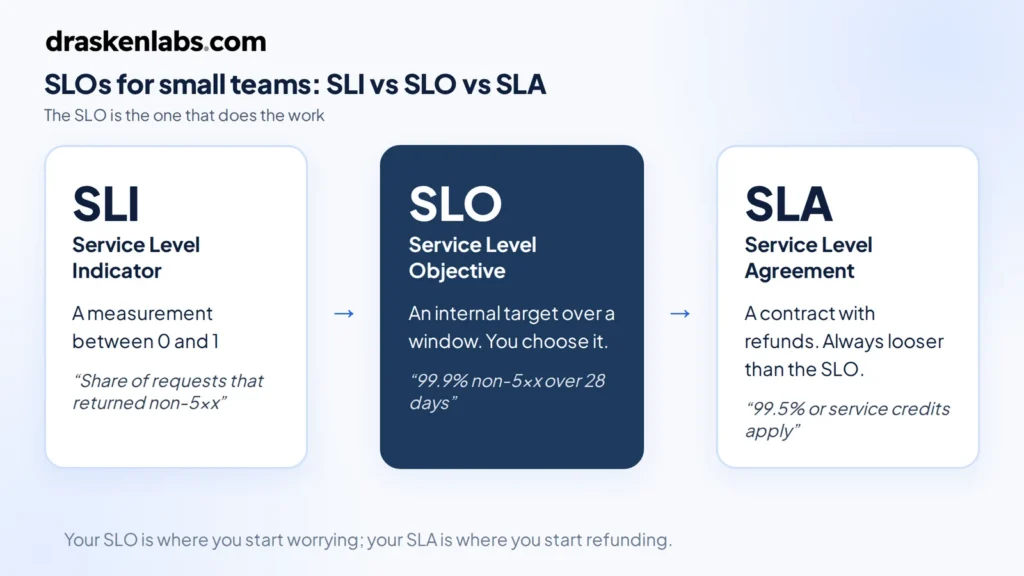
    SLOs for small teams: how an SLI, an SLO and an SLA differ
    How SLOs relate to SLIs and SLAs.

    The error budget is the whole point

    If your SLO is 99.9% over 28 days, you are explicitly saying that 0.1% failure is acceptable. That 0.1% is your error budget, and turning it into time makes it concrete:

    SLODowntime per 28 daysPer year
    99%6h 43m3d 15h
    99.5%3h 22m1d 19h
    99.9%40m 19s8h 45m
    99.95%20m 10s4h 23m
    99.99%4m 2s52m

    Look at 99.99% for a moment. Four minutes a month. That is less time than it takes a human to read a page, open a laptop, and log in. Hitting four nines means automated failover with no human in the loop, multi-region redundancy, and deployment practices that make bad releases nearly impossible. It is a different engineering budget entirely, not a slightly better version of three nines.

    This is the first thing an error budget does for you: it makes reliability targets cost something, so they stop being chosen by whoever wants to sound most ambitious in the meeting.

    The second thing is that it reframes reliability work as a resource rather than a virtue. You have not “failed” if you consumed 60% of your budget. You have used a resource you were allocated, buying deployment velocity with it. Budget remaining means ship faster. Budget exhausted means stop and fix. That’s a decision rule, which is more than “we value reliability” ever gave you.
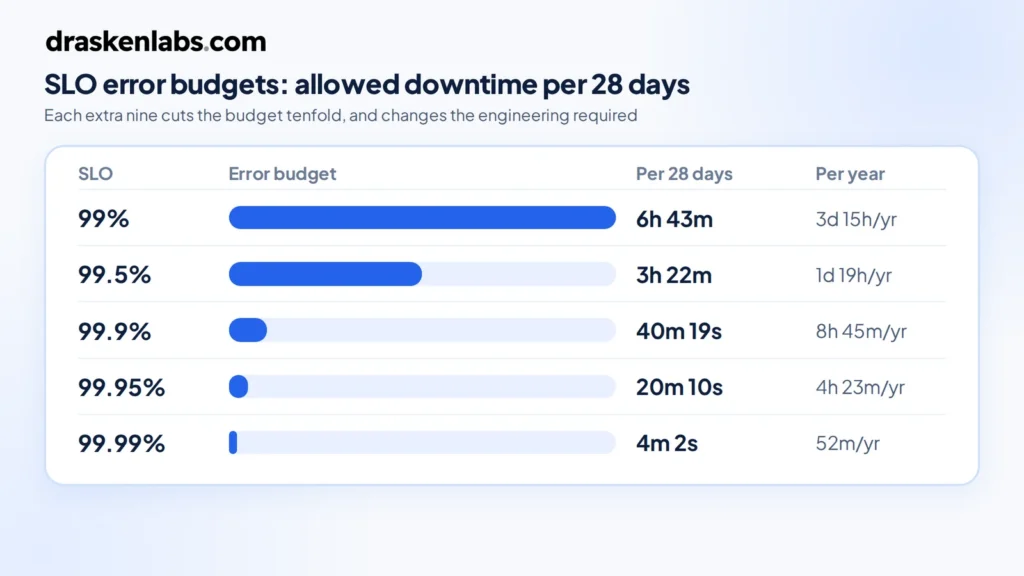
    SLOs and error budgets: allowed downtime per 28 days for 99% to 99.99% targets
    Error budgets for common SLOs over a 28-day window.

    Choosing SLIs that mean something

    Two rules cover most of it.

    Measure what the user experiences, not what the server reports. CPU utilisation is not an SLI. Neither is memory, disk, or pod restart count. Those are diagnostics — useful once something is wrong, useless as a definition of “wrong.” A service can be at 95% CPU and perfectly healthy, or at 5% CPU and completely broken.

    Never use averages for latency. Average response time is the single most misleading metric in production. If 95% of requests take 50ms and 5% take 30 seconds, your average looks acceptable and one in twenty of your users is furious. Use a threshold instead: the proportion of requests completing under 500ms. Now it’s a ratio, it composes with your availability SLI, and it can’t hide a tail.

    For most request-serving services, two SLIs is the right number:

    • Availability: successful requests ÷ valid requests
    • Latency: requests under threshold ÷ valid requests

    “Valid requests” matters. Exclude 4xx client errors from availability — a user sending a malformed request is not your service failing. Exclude health checks and synthetic traffic, or you’ll dilute your own signal with things no user ever touches.

    For non-request workloads, adapt the shape rather than the concept. Data pipelines: freshness, “the proportion of hours where output was less than 15 minutes stale.” Queue consumers: “the proportion of messages processed within 30 seconds of enqueue.” Batch jobs: completion within the expected window.

    Setting the target: measure first, then decide

    The most common failure is picking a target aspirationally. Someone says 99.9%, everyone nods, and three weeks later you’re missing it constantly, alerts are firing, and the team has learned to ignore them.

    Do it the other way round. Instrument the SLI, collect four weeks of data, and look at what you actually deliver. If you’re currently at 99.5%, set the SLO at 99.5%. Not 99.9%.

    That feels like cheating. It isn’t. The job of SLOs is to tell you when something has changed for the worse. A target you meet 99% of the time does that. A target you miss constantly tells you nothing except that you set it badly, and it trains your team to ignore the signal — which is a genuinely expensive thing to teach people.

    Once you’re comfortably meeting it, tighten it. Reliability targets should ratchet.

    The other half of the question is what your users actually need. A B2B tool used during Indian business hours has a different profile than a payments API. If your customers barely notice a two-minute blip, three nines may be more than they’re paying for, and the engineering effort is better spent elsewhere. Reliability beyond what users perceive is money you have set on fire.

    Burn rate alerting, not threshold alerting

    This is where SLOs stop being documentation and start improving your on-call.

    The naive approach is to alert when one of your SLOs is breached. Too late — you’ve already spent the budget. The slightly-less-naive approach is to alert on any error rate above zero, which pages you at 3am for a blip that consumed four seconds of a forty-minute budget.

    Burn rate solves this. Burn rate is how fast you’re consuming the error budget relative to the rate that would exhaust it exactly at the end of the window. Burn rate 1 means you’ll finish the month right on target. Burn rate 14.4 means you’ll exhaust a 28-day budget in about two days.

    The standard pattern, from the Google SRE workbook, uses two alerts:

    • Fast burn: burn rate above 14.4 sustained over 1 hour → page someone. Something is badly broken right now.
    • Slow burn: burn rate above 6 sustained over 6 hours → raise a ticket, don’t page. Something is degrading steadily and needs attention this week, not tonight.

    Each alert uses two windows — a long one for signal and a short one to confirm the problem is still happening — so alerts resolve when the incident does rather than lingering.

    The practical effect is that your pager fires on user-visible harm, proportional to severity. A brief spike that costs you thirty seconds of budget doesn’t wake anyone. A sustained failure does, immediately. Most teams we work with cut their page volume by more than half in the first month after switching, which does more for reliability than any dashboard, because a team that trusts its pager investigates instead of dismissing.
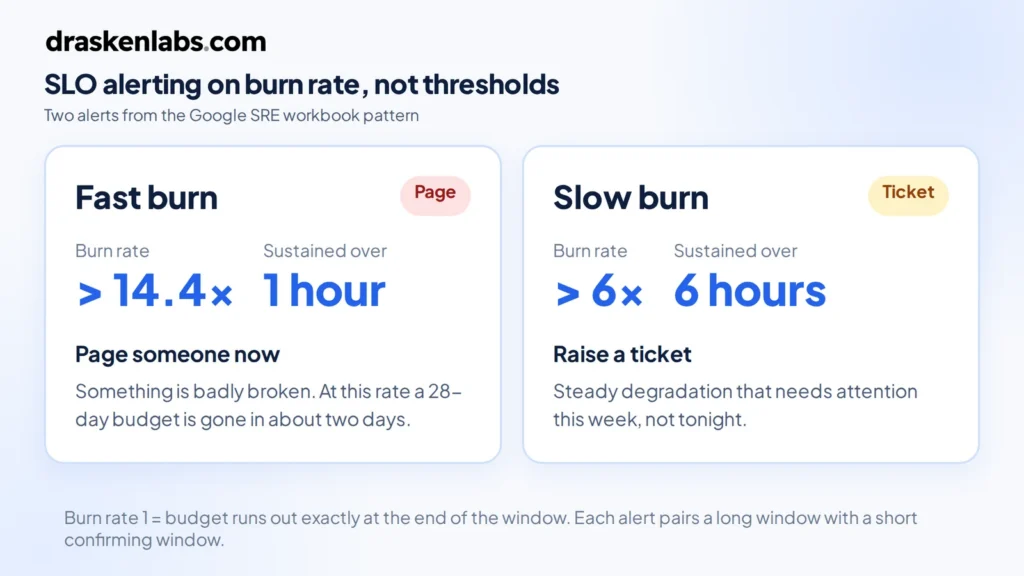
    SLO burn-rate alerting: fast burn above 14.4x over 1 hour pages, slow burn above 6x over 6 hours raises a ticket
    Burn-rate alerting for SLOs: fast burn pages someone, slow burn raises a ticket.

    The error budget policy

    An error budget without an agreed consequence is a chart nobody looks at. Write down, before you need it, what happens at each threshold. One page is enough:

    • Budget above 50% remaining: normal operation. Ship features.
    • Below 25%: no risky deployments. No schema migrations on Friday. Reliability items get pulled into the sprint.
    • Exhausted: feature work pauses. The team works on reliability until the budget recovers.
    • Two consecutive windows exhausted: the SLO was wrong or the architecture is inadequate. Escalate to a design conversation, not more heroics.

    The value here is that it’s agreed in advance, in calm conditions. Arguing about whether to pause the roadmap during an outage is a bad time to first discover that engineering and product have different views.

    Get explicit sign-off from whoever owns the roadmap. An error budget policy that engineering wrote alone is a policy that gets overruled the first time it’s inconvenient.
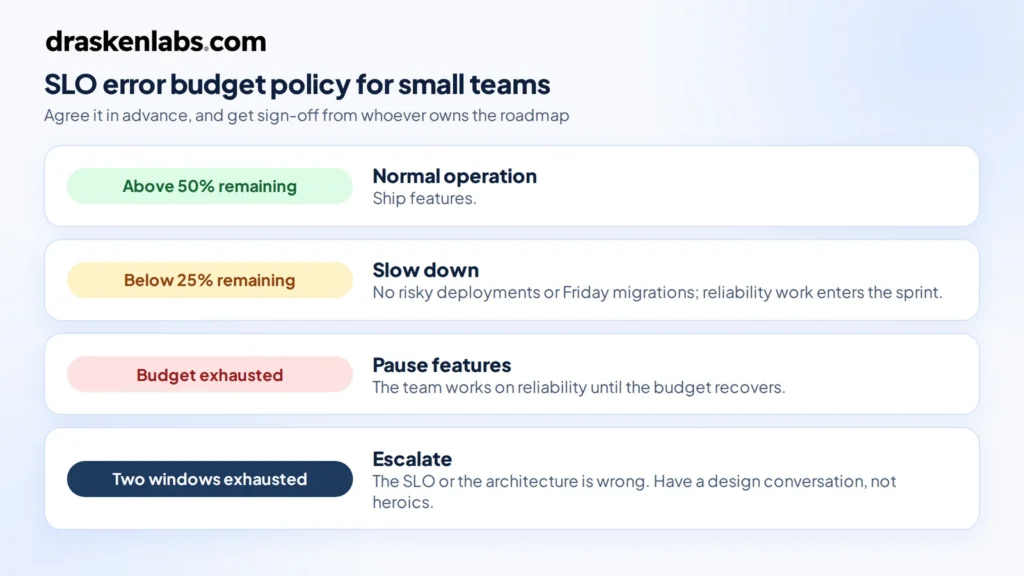
    SLO error budget policy thresholds: normal operation, slow down, pause features, escalate
    An error budget policy agreed before SLOs are breached.

    Where teams go wrong

    Too many SLOs. Every service, four indicators each, thirty dashboards nobody reads. Start with your two or three most important user-facing services and one or two SLIs each. That is enough to change behaviour, which is the only test that matters.

    SLOs on internal services. If a user never touches it directly, its reliability matters only through its effect on something they do touch. Measure the user-facing thing. Internal service health is a diagnostic.

    A 100% target. Not achievable, and it destroys the mechanism. Zero error budget means every deploy is a violation, so the concept gets abandoned within a month.

    Never revisiting them. Traffic patterns change, architectures change, user expectations change. Review targets quarterly.

    Tracking without acting. The most common outcome by far. A beautiful Grafana dashboard, burn-rate alerts wired up, and no agreed consequence when the budget goes. It becomes decoration. The policy is not the boring part of SLOs, it’s the entire point.

    Making SLOs work for small teams in practice

    You don’t need a platform team. On a Prometheus and Grafana stack: recording rules to compute the SLI ratios, multi-window burn-rate alerts in Alertmanager, one Grafana panel per SLO showing budget remaining. Sloth generates the rules from a short YAML spec if you’d rather not hand-write them, and OpenSLO gives you a vendor-neutral format if you expect to move backends. Datadog, Grafana Cloud, and Honeycomb all have native support for SLOs if you’re already paying for one.

    The instrumentation matters more than the tooling. Your SLIs are only as good as the data underneath them, which is a question of how you’ve instrumented your services and how much of that data you can afford to keep — the cardinality problem that quietly determines what your observability stack costs.

    We took one healthtech client from no coverage across 200+ microservices to full instrumentation with SLOs and burn-rate alerting in under two weeks, cutting mean time to detect below two minutes. The instrumentation was the fast part. Agreeing what “good” meant for each service took longer, and mattered more.

    If your alerts fire constantly and nobody trusts them, that’s usually an SLO problem wearing a monitoring costume. Tell us what you’re running and we’ll take a look — it’s the core of our observability work.

    Sources and further reading

  • Freelancer vs Web Development Company in 2026: Which Should You Hire?

    Freelancer vs Web Development Company in 2026: Which Should You Hire?

    Freelancer vs web development company is a common decision for businesses planning a new website. A freelancer can be a practical choice for a small, clearly defined project, while a web development company can provide broader expertise, structured development, and ongoing support for more complex requirements.

    Short answer: hire a freelancer when the job is small, clearly defined, and you have the time to manage it yourself. Hire a web development company when the website has to generate business, connect to other systems, or keep working reliably long after launch.

    Most bad website projects are not caused by bad developers. They are caused by a mismatch: a company hired to build a single landing page, or one freelancer asked to deliver what is really a software project with design, integrations, SEO, hosting and security all riding on one person.

    We are a website development company, so read this with that in mind. We have also told plenty of prospective clients that a good freelancer was the better fit for them. This guide is the same reasoning we use in those conversations.

    The real difference is not price

    The obvious difference is cost: freelancers usually quote less. But the thing you are actually buying is different in each case.

    With a freelancer, you are buying one person’s skills and one person’s availability. If that person is a strong designer, you get strong design. If they are weaker at backend work, security or SEO, the project inherits those gaps. And if they get sick, take on a bigger client, or simply stop replying, the project stops.

    With a web development company, you are buying a team and a process. A professional website touches several distinct skills: UX and visual design, frontend development, backend and integrations, technical SEO, testing, hosting and deployment, and project management. A company can put a different specialist on each, review each other’s work, and keep going if someone is unavailable.

    So the real question is not “who is cheaper?” It is: how many of those skills does your project actually need, and who will cover the ones a single person can’t?

    When a freelancer is the right choice

    A good freelancer can be an excellent choice, and often the most sensible one. Freelancers tend to work best when:

    • The scope is small and fixed. A landing page, a portfolio, a small brochure website on a proven template, or a specific fix on an existing site.
    • You can manage the project yourself. You will write the brief, provide the content, review the work and make the decisions.
    • The budget is tight and a simple online presence is genuinely all the business needs right now.
    • You need one specific skill, such as a WordPress theme tweak, a Figma design, or speeding up an existing page.
    • You have found a proven specialist with live work you can inspect and references you can call.

    Advantages of hiring a freelancer

    • Lower cost, because there is little or no company overhead.
    • Direct communication with the person doing the work.
    • Fast start on small jobs, with no lengthy discovery phase.
    • Flexibility on process, timing and small changes.

    Disadvantages of hiring a freelancer

    • Single point of failure. Illness, holidays, a bigger client or a career change can pause or end your project.
    • Limited skill coverage. Few individuals are equally strong at design, development, SEO, security and hosting.
    • You become the project manager. Planning, chasing and quality checking fall on you.
    • Weaker accountability. Agreements are often informal, and enforcing them across cities or countries is hard.
    • Thin post-launch support. Maintenance is usually best effort, fitted around other clients.

    When a web development company is the right choice

    A company earns its higher price when the website is part of how the business makes money. Choose a company when:

    • The website is a lead-generation or sales channel, and its performance affects revenue.
    • It needs integrations with a CRM, payment gateway, booking system, ERP, WhatsApp or internal APIs.
    • SEO matters from day one, which means site architecture, not just meta tags added at the end.
    • It handles data or logins, such as customer accounts, dashboards, portals or payments.
    • You need it maintained and extended for years, not delivered and left alone.
    • You don’t have time to manage developers and want one accountable party.

    Once a website starts handling business logic (accounts, payments, workflows, data) it stops being a web design job and becomes a custom software development project. That is where the gap between one person and a team becomes very visible.

    Advantages of hiring a web development company

    • Multiple specialists: design, frontend, backend, QA, DevOps and project management.
    • A defined process with scoping, milestones, testing and handover.
    • Continuity: the project doesn’t stop if one person is unavailable.
    • Formal contracts, tax invoices and a registered entity you can hold accountable.
    • Structured support after launch, including maintenance, hosting and monitoring.
    • Capacity to grow with you, from website to portal to app.

    Disadvantages of hiring a web development company

    • Higher cost, since you are paying for the team, process and overhead.
    • Slower to start, because good companies scope before they build.
    • Less flexible for tiny changes, which may go through a change-request process.
    • Uneven quality across the market. Some agencies sell senior expertise and hand the work to juniors or subcontracted freelancers.

    Freelancer vs web development company: side-by-side

    FactorFreelancerWeb development company
    Upfront costUsually lowerUsually higher
    Speed to startOften immediateScoping and planning first
    Skill coverageOne person’s strengthsDesign, development, QA and DevOps together
    Project managementMostly on youDedicated lead or project manager
    Quality assuranceSelf-testedSeparate review and testing
    Availability riskHigh: one personLow: team continuity
    AccountabilityOften informal agreementsContracts, invoices, registered business
    Security practicesDepends on the individualShould be defined (ask to see them)
    Post-launch supportBest effortMaintenance plans and response times
    Growing the projectHard to add capacityCan add people and skills
    Best forSmall, fixed, low-risk jobsBusiness-critical sites and web apps

    The hidden costs nobody quotes you

    The invoice is only part of what a website costs. (For typical budgets by website type, see our guide on how much a professional business website costs in 2026.) The costs that don’t appear on a quote are often the ones that decide whether the cheaper option really was cheaper.

    Hidden costs of the freelancer route

    • Your time. Every hour you spend writing briefs, chasing updates and testing pages is an hour not spent running the business.
    • Rework. A site that looks right but loads slowly, breaks on mobile or can’t be indexed properly often has to be partly rebuilt.
    • Handover pain. When a freelancer moves on, the next developer has to reverse-engineer undocumented code, plugins and server setup.
    • Ownership gaps. Domains, hosting and analytics accounts registered in the freelancer’s name can be very hard to recover.

    Hidden costs of the company route

    • Change requests. Anything outside the agreed scope is usually billed separately. Agree how changes are priced before you sign.
    • Over-engineering. Some companies sell complex solutions to simple problems. A five-page site does not need a custom platform.
    • Lock-in. Proprietary builders or hosting you can’t move away from make every future change more expensive.

    Which should you choose for your project?

    What you are buildingUsually the better fit
    Single landing page or campaign pageFreelancer
    Small brochure site on a proven templateFreelancer or small studio
    Lead-generation business website with CMS, SEO and analyticsCompany, or a senior freelancer with a proven track record
    E-commerce store with payments, inventory and shippingCompany
    Customer portal, SaaS or web applicationCompany or engineering team
    Website plus a mobile app sharing one backendCompany
    Ongoing product development over yearsCompany or dedicated team

    A useful test: if the website went down for three days, what would it cost you? If the honest answer is “not much,” a freelancer is probably fine. If the answer involves lost leads, failed payments or customers who can’t log in, you need a team that can respond.

    The middle options

    It isn’t always a binary choice:

    • Small studios of two to five people often combine freelancer pricing with some of a company’s continuity.
    • Start with a freelancer, move up later. This works well if you insist on clean, documented code and keep every account in your own name from the start.
    • Split the work. A company handles the build, hosting and integrations. A freelancer or your own team handles routine content updates in the CMS.
    • Company for the platform, freelancer for campaigns. The core site stays stable while campaign pages are produced quickly and cheaply.

    Red flags to watch for

    When hiring a freelancer

    • No portfolio of live websites you can open and test on your phone.
    • Wants to register your domain or hosting in their own name.
    • No written scope, timeline or payment milestones.
    • A price far below every other quote, with no explanation.
    • Can’t explain how they will handle SEO, security or backups.

    When hiring a web development company

    • The salesperson can’t answer basic technical questions, and you never meet an engineer before signing.
    • They won’t tell you who will actually work on your project.
    • Every project is squeezed into the same template package.
    • The change-request policy is vague.
    • No case studies or references you can verify.

    Questions to ask before you hire anyone

    Whether you choose a freelancer or a company, ask these before signing:

    • Who will actually do the work? Named people, not “our team.”
    • Will the domain, hosting, analytics and CMS accounts be in my name? The answer should be yes.
    • Do I receive the source code and design files? Get it in writing.
    • How do you test before launch? Look for mobile, browser, speed, form and security checks.
    • How is SEO handled during the build? Site structure, page speed and indexability, not just meta tags. Google’s own SEO Starter Guide is a good baseline to compare against.
    • Is the site accessible? Ask whether they design against WCAG guidelines.
    • What happens if you are unavailable for two weeks? The answer tells you a lot about continuity.
    • What does support cost after launch, and how quickly do you respond when the site is down?
    • How are changes priced once the project is under way?

    How Drasken Labs approaches this

    Drasken Labs is an engineering-led development company. We scope before we quote, and if a project is small enough that a good freelancer would serve you better, we say so.

    When a company is the right fit, the same team handles the whole lifecycle: design and development, integrations, hosting and DevOps, and monitoring after launch. You own your code, your domain and your accounts from day one. Our website development service covers business sites, CMS builds and e-commerce, and larger projects move into custom software development when the requirements call for it.

    You can see how this works in practice in our work with GatimaanPayments and the TheMMK Studio website, or browse all of our projects.

    Final thoughts

    Neither option is better in general. A freelancer is the efficient choice for small, well-defined work you can manage yourself. A web development company is the safer choice when the website is a business system that has to perform, integrate and keep running.

    Decide what the website needs to do, estimate what it would cost you if it failed, and hire accordingly.

    Not sure which your project needs?

    Tell us what you are building. We will give you a straight answer on scope, even if that answer is “hire a freelancer.”

    Talk to the Drasken Labs team

    Sources and further reading

    Is it cheaper to hire a freelancer or a web development company?

    A freelancer is usually cheaper upfront because there is less overhead. The total cost can end up higher if the project needs rework, runs late or has to be handed to a new developer. For small, fixed-scope work a freelancer is usually the more economical option. For business-critical websites, the lower risk of a company often makes it cheaper over the life of the site.

    Is a freelancer good enough for a small business website?

    Often, yes. If you need a simple brochure website, the freelancer has live work you can check, and you keep the domain and hosting in your own name, a freelancer can deliver a good result. Consider a company once the website needs integrations, e-commerce, customer logins or ongoing development.

    What are the risks of hiring a freelance web developer?

    The main risks are availability (one person is a single point of failure), gaps in skills such as security or SEO, limited testing, informal agreements that are hard to enforce, and handover problems if the freelancer moves on. Written scopes, milestone payments and keeping every account in your name reduce most of them.

    How do I make sure I own my website?

    Register the domain, hosting, analytics and CMS accounts in your own name, and add the developer as a user rather than the owner. Your contract should state that you receive the source code, design files and database on final payment.

    Can I start with a freelancer and move to a company later?

    Yes, and many businesses do. It goes smoothly when the original site uses mainstream technology, the code is documented and every account is in your name. Undocumented custom code or accounts held by the freelancer make the move slower and more expensive.

    Should I hire a web development company in India?

    Indian development companies serve clients worldwide and can offer strong value. Judge any company, wherever it is based, on the same things: who does the work, how the project is managed and tested, who owns the code, how communication across time zones works, and what support looks like after launch.

  • How Much Does a Professional Business Website Cost in 2026?

    How Much Does a Professional Business Website Cost in 2026?

    A professional business website can cost anywhere from a few hundred dollars to tens of thousands of dollars, depending on what you need the website to accomplish.

    In 2026, businesses are no longer building websites simply to have an online presence. A modern business website may need to generate leads, rank in search engines, integrate with a CRM, support marketing campaigns, load quickly, work across devices, and provide a foundation for future digital products.

    As a result, the question is not simply “How much does a website cost?” but rather:

    “What kind of website does my business actually need?”

    For planning purposes, typical website development budgets can look like this:

    Website typeTypical 2026 budget
    Basic/template business website$500–$2,000
    Professional business website$2,000–$7,500
    Custom business website$5,000–$15,000+
    Advanced website/web platform$15,000–$50,000+

    These are general planning ranges rather than fixed market prices. The actual cost depends on the website’s design, functionality, content, integrations, technology, SEO requirements, and development scope.

    What Determines the Cost of a Professional Business Website?

    Two websites can have the same number of pages and completely different development costs.

    A five-page website using an existing template may take considerably less work than a five-page website with custom UX, animations, integrations, technical SEO, a CMS, analytics, and custom backend functionality.

    Here are the major factors that influence the price.

    1. Website size and complexity

    The number of pages is one factor, but it isn’t the most important one.

    A simple company website might contain:

    • Home
    • About
    • Services
    • Case Studies
    • Contact

    A larger website might include:

    • Multiple service categories
    • Industry pages
    • Location pages
    • Blog/resource center
    • Case studies
    • Careers
    • Knowledge base
    • Customer portal
    • Product pages

    More pages generally mean more content, design and development work. However, the complexity of each page matters just as much as the page count.

    2. Design and user experience

    A template-based website can be relatively inexpensive because much of the visual structure already exists.

    A custom-designed website requires more work.

    The process may involve:

    • User research
    • Information architecture
    • Wireframes
    • UX design
    • Visual design
    • Responsive layouts
    • Design systems
    • Interactive elements
    • Conversion optimization

    For businesses competing in crowded markets, the website often needs to communicate credibility within seconds. This makes UX and visual design an important part of the overall investment.

    3. Custom development

    A website can range from a collection of CMS pages to a custom software system.

    For example, a marketing website may only require a CMS and contact forms.

    A more sophisticated website might require:

    • Custom APIs
    • User authentication
    • Customer dashboards
    • Database functionality
    • CRM integration
    • Payment processing
    • Booking systems
    • Third-party APIs
    • Automated workflows

    Once a website starts handling business logic, it moves beyond conventional web design and becomes a software development project.

    4. Content creation

    Website development and website content are related, but they are not always the same service.

    A professional website may require:

    • Website copywriting
    • Service descriptions
    • Product descriptions
    • Case studies
    • Blog content
    • Photography
    • Illustrations
    • Videos
    • Infographics

    If the development team is also responsible for producing or restructuring the content, the project scope increases.

    5. Search engine optimization

    SEO should not be treated as something that is added after a website has been developed.

    A search-friendly website needs an appropriate architecture from the beginning.

    This can include:

    • Search-friendly URLs
    • Logical information architecture
    • Internal linking
    • Metadata
    • Structured data
    • Semantic HTML
    • Indexability
    • Mobile responsiveness
    • Performance optimization
    • Image optimization
    • Content structure

    Technical SEO is therefore one of the factors that can affect website development cost.

    6. Integrations

    Modern business websites frequently need to communicate with other systems.

    Examples include:

    • CRM systems
    • Email marketing platforms
    • Payment gateways
    • Analytics platforms
    • Marketing automation tools
    • Customer support systems
    • ERP systems
    • Booking platforms
    • WhatsApp integrations
    • Internal business APIs

    A simple contact form is relatively straightforward.

    Synchronizing leads between a website, CRM and marketing automation system is a different level of development.

    7. Performance, security and scalability

    A professional website also needs to work reliably after launch.

    Depending on the project, development may include:

    • Performance optimization
    • Caching
    • Image optimization
    • Security configuration
    • Form protection
    • Access control
    • Backup strategy
    • Monitoring
    • Error tracking
    • Scalable hosting architecture

    These requirements may not be visible to visitors, but they contribute significantly to the quality of the finished system.


    Website Development Cost by Type

    Not every business needs the same type of website.

    Basic business website: $500–$2,000

    A basic website is generally appropriate for businesses that primarily need an online presence.

    It may include:

    • A pre-built theme or template
    • A small number of pages
    • Responsive design
    • Contact form
    • Basic CMS
    • Basic analytics
    • Basic SEO configuration

    This approach keeps the initial investment low, but customization and advanced functionality may be limited.

    Professional business website: $2,000–$7,500

    A professional business website is designed around the company’s brand, audience and business objectives.

    It may include:

    • Custom or heavily customized design
    • Conversion-focused page structure
    • Responsive UI
    • CMS
    • SEO-ready architecture
    • Analytics
    • Lead-generation forms
    • Performance optimization
    • Third-party integrations
    • Professional content structure

    This is often the range businesses consider when the website is an important part of their marketing and sales operation.

    Custom business website: $5,000–$15,000+

    A custom website goes further than a conventional marketing website.

    It may involve:

    • Fully custom UI/UX
    • Custom frontend development
    • Custom backend functionality
    • API integrations
    • CRM integrations
    • Advanced content management
    • Customer portals
    • Custom workflows
    • Advanced SEO architecture

    The exact price depends heavily on the technical requirements.

    Advanced web platform: $15,000–$50,000+

    At this level, you’re often building a software product rather than simply a company website.

    Examples include:

    • SaaS platforms
    • Customer portals
    • Membership platforms
    • Complex e-commerce systems
    • Marketplace platforms
    • Booking platforms
    • Data dashboards
    • Enterprise web applications

    These projects require considerably more planning, engineering, testing and ongoing maintenance.


    What Should a Professional Business Website Include in 2026?

    A professional website should do more than look good.

    At a minimum, businesses should consider the following.

    Responsive design

    The website should provide a usable experience across:

    • Desktop
    • Laptop
    • Tablet
    • Mobile

    Clear conversion paths

    Visitors should understand what to do next.

    Depending on the business, this could mean:

    • Request a quote
    • Book a consultation
    • Call the company
    • Submit an inquiry
    • Request a demo
    • Purchase a product
    • Download a resource

    SEO-ready architecture

    The website should provide a solid technical foundation for organic search.

    Analytics

    Businesses should be able to understand:

    • Where visitors come from
    • Which pages they visit
    • Which campaigns generate traffic
    • Where users convert
    • Which pages need improvement

    Content management

    For businesses that regularly publish content, a CMS can make it easier for internal teams to update the website without requiring developers for every change.

    Security

    Forms, authentication, APIs and administrative functionality should be appropriately protected.

    Performance

    A professional website should be designed with page speed and efficient delivery in mind.

    Scalability

    The architecture should account for what happens when the company adds:

    • More services
    • More content
    • New integrations
    • New markets
    • New functionality

    Cheap Website vs. Professional Website

    The difference between a low-cost website and a professional website is not simply the number on the invoice.

    It is usually the amount of work behind the website.

    AreaLow-cost approachProfessional approach
    DesignTemplate-basedCustom or strategically customized
    UXBasicDesigned around user journeys
    ContentCustomer-providedStructured and optimized
    SEOBasic setupConsidered throughout architecture
    PerformanceVariableDeliberately optimized
    IntegrationsLimitedCustom integrations where required
    ScalabilityOften limitedPlanned around future requirements
    AnalyticsBasicConnected to business goals
    SupportVariesDefined development/support process

    A low-cost website isn’t necessarily the wrong choice.

    If your business only needs a simple online presence, spending tens of thousands of dollars may not make sense.

    The important question is whether the website’s capabilities match the business requirement.


    How Much Should a Business Budget for a Website?

    Instead of choosing a budget based purely on the number of pages, start with the business objective.

    A new or small business

    If the primary goal is establishing an online presence and generating basic inquiries, a budget around $1,500–$4,000 may be appropriate depending on the scope.

    An established small or medium-sized business

    If the website is an important lead-generation and marketing channel, a budget around $3,000–$10,000 can provide room for better design, content structure, SEO, integrations and conversion optimization.

    A B2B or technology company

    Companies selling higher-value services or software may require a more sophisticated website.

    A budget of $5,000–$15,000+ may be appropriate when the project includes custom design, technical SEO, integrations and more extensive content architecture.

    A company building a web application

    Once the website includes authentication, dashboards, databases, payments, complex workflows or substantial business logic, it should be budgeted as a software project.

    These projects can start around $15,000 and increase substantially depending on scope.


    How Much Does Website Development Cost in India?

    India has a broad website development market, ranging from individual freelancers and small teams to established software development companies.

    Consequently, there is no single “Indian website development price.”

    You may find:

    • Very low-cost freelancer packages
    • Template-based agency packages
    • Mid-market professional development services
    • Custom software development companies
    • Enterprise development teams

    The difference between these options is usually reflected in scope, process, engineering expertise, design, project management, support and the complexity of the final product.

    For international businesses, the more useful question isn’t simply whether a development company is based in India.

    Instead, evaluate:

    • What is included?
    • Who owns the code?
    • How is the project managed?
    • How is quality tested?
    • How is SEO handled?
    • What happens after launch?
    • Can the team support future development?
    • Can the company work effectively across time zones?
    • Are security and performance considered?
    • Is the architecture capable of evolving with the business?

    Location can affect pricing, but it should not be the only factor used to evaluate a development partner.


    How Does Drasken Labs Approach Business Website Development?

    At Drasken Labs, we approach a business website as a digital business system, rather than simply a collection of pages.

    The process can include four major stages.

    1. Understand the business

    Before development, we look at:

    • Business objectives
    • Target customers
    • Existing website
    • Competitors
    • Services or products
    • Lead-generation requirements
    • Existing technology
    • Future requirements

    2. Plan the website

    We define:

    • Sitemap
    • Page hierarchy
    • User journeys
    • Content structure
    • Conversion paths
    • SEO architecture
    • Technical requirements

    This helps ensure that the website has a purpose before development begins.

    3. Design and develop

    Depending on the project, development can include:

    • Custom responsive UI
    • Frontend development
    • CMS integration
    • Backend development
    • API integrations
    • CRM integrations
    • Analytics
    • SEO implementation
    • Performance optimization

    The technology is selected according to the requirements rather than forcing every project into the same stack.

    4. Test and launch

    Before launch, the website can be evaluated for:

    • Responsive behavior
    • Browser compatibility
    • Forms
    • Links
    • Performance
    • SEO fundamentals
    • Security
    • Analytics
    • Deployment configuration

    The objective is to deliver a website that is ready to become part of the company’s ongoing marketing and sales infrastructure.


    What Makes a Website Worth the Investment?

    A website becomes more valuable when it contributes to the business beyond simply existing online.

    For example, a professional website can become the foundation for:

    SEO → Organic traffic → Content → Leads → CRM → Sales

    It can also become the starting point for:

    Website → Customer portal → Automation → Internal systems → Digital product

    This is why the cheapest website isn’t necessarily the least expensive option, and the most expensive website isn’t necessarily the right option.

    The appropriate investment is the one that matches your business requirements.


    Questions to Ask Before Hiring a Website Development Company

    Before signing a website development contract, ask:

    What exactly is included?

    Clarify:

    • Number of pages
    • Design
    • Development
    • Content
    • SEO
    • Hosting
    • Analytics
    • Integrations
    • Testing
    • Deployment

    Who owns the website?

    Make sure you understand ownership of:

    • Source code
    • Design files
    • Domain
    • Hosting account
    • Content
    • Database
    • Third-party accounts

    Is SEO included?

    Ask whether SEO means only metadata or whether the website architecture is actually designed to support search visibility.

    What happens after launch?

    Understand:

    • Bug-fix period
    • Maintenance
    • Security updates
    • Hosting
    • Support
    • Future development

    Can the website grow with the business?

    A website that works today may need to support substantially more functionality in two or three years.

    Discuss future requirements before choosing the architecture.

    Final Thoughts

    The cost of a professional business website in 2026 can range from a few thousand dollars to tens of thousands of dollars.

    But the price should never be evaluated in isolation.

    A business website can be:

    • A digital brochure
    • A lead-generation engine
    • An SEO platform
    • A sales channel
    • A customer portal
    • Or the foundation of a larger software product

    The right budget depends on what you need the website to accomplish.

    If your business needs more than a template and you want a website designed around your brand, customers, SEO, lead generation and future growth, the first step is to define the requirements and scope before deciding on a technology or budget.

    Building a new business website?

    Tell us what you’re trying to build, what your business needs, and where you want the website to take you. The Drasken Labs team can help you define the scope, technical approach and development requirements for your project.

    Discuss your website project with Drasken Labs →

    How much does a professional business website cost in 2026?

    A professional business website commonly falls somewhere around $2,000–$7,500, while more customized websites can cost $5,000–$15,000 or more. The actual cost depends on design, functionality, content, SEO, integrations and technical requirements.

    How much does a 5-page business website cost?

    A five-page website can cost anywhere from several hundred dollars to several thousand dollars. Page count alone isn’t enough to determine the price because custom design, integrations, content and technical requirements can significantly change the scope.

    Is $1,000 enough for a professional website?

    It can be enough for a relatively simple business website, particularly when using an existing theme or template. A highly customized website with extensive design, SEO, integrations and custom development would generally require a larger budget.

    How much does a custom website cost?

    Custom business websites commonly start around $5,000 and can exceed $15,000, depending on the functionality and engineering requirements.

    How long does it take to build a professional website?

    A relatively straightforward professional website may take several weeks. More complex websites can take several months. The timeline depends on scope, content readiness, design revisions, integrations and development complexity.

    Does website development include SEO?

    It depends on the development company and project scope. Technical SEO should be considered during development, but ongoing SEO generally involves additional content, authority building, technical improvements and continuous optimization.

    Should I choose WordPress or a custom website?

    Neither is universally better.
    WordPress can be appropriate for businesses that need a flexible content management system and a relatively conventional website.
    Custom development can make more sense when the business requires unique functionality, complex integrations, specialized workflows or greater control over the application architecture.
    The choice should follow the business requirements.

    How much does website maintenance cost?

    Maintenance costs vary considerably. A simple website may require only occasional updates, while a custom application may need continuous development, monitoring, security updates and infrastructure management.

  • High Cardinality Metrics: Why Your Observability Bill Grew 4x

    High Cardinality Metrics: Why Your Observability Bill Grew 4x

    High cardinality metrics are the reason, almost every time.

    Traffic grew 30% this year. The observability bill grew 400%. Nobody changed the vendor, nobody added a new tool, and no single person can explain what happened.

    This is one of the most common infrastructure cost surprises we see, and it’s almost always the same cause. Observability platforms do not bill by traffic. They bill by the number of distinct things you ask them to remember. That number is cardinality, and it multiplies rather than adds.

    Once you understand the multiplication, the fix is mechanical.

    What high cardinality metrics actually are

    A metric is not one number. A metric with labels is one number per unique combination of label values, and each of those combinations is a separate time series that has to be stored, indexed, and queried.

    Take a request counter:

    http_requests_total{service, endpoint, method, status}

    With 10 services, 20 endpoints, 4 methods, and 5 status codes, that’s 10 × 20 × 4 × 5 = 4,000 time series. Entirely fine.

    Now someone adds customer_id to help debug a support ticket. You have 5,000 customers.

    4,000 × 5,000 = 20 million time series, from one line of code.

    The traffic didn’t change. The number of requests didn’t change. But your storage, your index size, your query latency, and your bill all changed by three orders of magnitude, and the commit that did it looked completely reasonable in review.

    This is the shape of nearly every observability cost incident: a small, sensible-looking change to a label set.

    The labels that cause it

    Some values are unbounded by nature. Putting any of these in a metric label is how you get the 400% bill.

    • User or customer identifiers. Grows with your business. This is the classic.
    • Request or trace IDs. Unique per request. Every single request creates a new time series that is written once and never queried again.
    • Raw URL paths. /api/users/8f3a2b and /api/users/c91e4d are different label values. Every user ID in a path becomes a series.
    • Email addresses, session tokens, order numbers. Same problem, and often a privacy issue on top.
    • Container, pod, or instance IDs. Subtler and very common. In a Kubernetes environment with rolling deploys, pod names change on every release. Deploy ten times a day and you generate ten new sets of series daily, most of them dead within the hour but still stored, still indexed, still billed.
    • Full error messages. "connection refused to 10.0.4.19:5432" is not a label value. "connection_refused" is.
    • Timestamps. Rare but catastrophic. Every scrape becomes a new series.

    The pod-ID one deserves emphasis because it hides. Nobody deliberately adds it — it arrives by default from a Kubernetes service discovery config or an auto-instrumentation library, and it silently multiplies your entire metric set by your deploy frequency.

    The rule that resolves it

    Metrics, traces, and logs have different cost profiles, and the discipline is to put each dimension where it belongs.

    Metrics are for low-cardinality aggregate questions. How many requests, how many errors, what’s the p99. Bounded labels only: service name, endpoint template, method, status class, environment, region. If a label’s value set could grow without limit, it does not belong on a metric.

    Traces are for high-cardinality specifics. This is the correct home for user IDs, request IDs, order numbers, feature flag states, and full URLs. Span attributes are stored per-span, not as a cross-product, so adding an attribute costs you linearly rather than multiplicatively. The rule of thumb: anything you want to filter one request by belongs on a span; anything you want to graph over time belongs on a metric.

    Logs are for detail, sampled and retained deliberately. Cheap per event, ruinous in aggregate. CloudWatch Logs bills around $0.50 per GB ingested; most vendors are comparable. A service logging every health check at debug level generates a remarkable amount of money’s worth of nothing.

    Almost every cardinality problem we’ve debugged was a high-cardinality dimension that had been put on a metric when it should have been on a span.

    Templating your paths

    The single highest-value fix, and the one most often missed.

    Auto-instrumentation frequently records the raw request path. You want the route template:

    BAD:   http_requests_total{path="/api/users/8f3a2b/orders/119"}
    GOOD:  http_requests_total{route="/api/users/{id}/orders/{order_id}"}

    Most frameworks expose the matched route rather than the raw path — Express, FastAPI, Spring, Rails all do. Use it. The OpenTelemetry semantic conventions specify http.route for exactly this reason, and if your instrumentation is populating http.target into a metric label instead, that’s your bug.

    While you’re there: use the semantic conventions generally. Naming your attributes http.request.method and service.name rather than inventing your own means your dashboards and alerts survive a change of vendor or instrumentation library, which is worth more than it sounds like the day you need it.

    The Collector is your control point

    Instrumenting every service to emit exactly the right data, and keeping it that way as forty developers commit, is not achievable. Put the enforcement somewhere central instead.

    The OpenTelemetry Collector sits between your applications and your backend. Everything passes through it, which makes it the one place you can apply policy without touching application code.

    Drop attributes before they reach the backend. An attributes processor can delete user.id and session.token from metrics while leaving them on spans. One config change, applied to every service.

    Filter what you don’t need. Health check spans, /metrics scrapes, readiness probes. These are pure noise and they’re often a double-digit percentage of your span volume.

    Batch. Reduces network overhead and, with per-request-billing vendors, directly reduces cost.

    Switch backends without redeploying anything. Because your applications speak OTLP to the Collector and only the Collector knows about your vendor, changing vendors is a config change. This is the strongest practical argument for OpenTelemetry over vendor-specific agents, and it’s worth setting up before you need it, not during a contract renegotiation.

    Run it as a DaemonSet for node-local collection, plus a gateway deployment for anything requiring a full view of a trace. That second part matters for the next section.

    Sampling traces properly

    You cannot afford to store every trace at any real volume. The question is which ones you keep.

    Head sampling decides at the start of the request, usually with a fixed probability. Cheap, simple, and stateless — but it decides before knowing whether the request failed or took nine seconds. At 1% head sampling you throw away 99% of your errors, which are the traces you actually wanted.

    Tail sampling buffers complete traces and decides after seeing the outcome. This is what you want:

    • Keep 100% of traces containing an error
    • Keep 100% of traces above a latency threshold
    • Keep 100% of traces for low-traffic endpoints, which would otherwise vanish entirely
    • Keep 1–5% of everything else as a healthy baseline

    The result is that you store a small fraction of your volume while retaining essentially all of the diagnostically interesting traces. Ten to twenty times cost reduction with better debugging is not a typical trade in infrastructure, and it’s available here.

    The catch: tail sampling requires all spans of a trace to reach the same Collector instance. That means a gateway tier with trace-ID-aware load balancing in front of it, and memory sized for your buffering window. It’s a real piece of architecture, not a config flag, but it’s a day’s work and it pays for itself immediately.

    Log discipline

    Three changes cover most of the waste.

    Drop noise at the source. Health checks, readiness probes, and load balancer pings should be filtered at the agent or Collector, not ingested and then ignored. This is frequently 20–40% of log volume in a Kubernetes environment.

    Structure your logs. JSON, with consistent field names, and the trace ID included so you can jump from a log line to the full trace. Unstructured logs force you to pay for full-text indexing to get anything back out.

    Tier your retention. Seven days hot and searchable, ninety days in object storage for compliance, nothing beyond that unless a regulator says otherwise. Setting explicit retention on every log group matters because the default on most platforms is “keep forever,” which is almost never what anyone intended.

    And the recurring one: audit your log levels in production. Debug logging left on after an incident is one of the most common causes of a sudden bill increase we see.

    A quick audit

    Half a day, and it usually finds most of it.

    1. Find your top series by cardinality. On Prometheus, topk(20, count by (__name__)({__name__=~".+"})) shows which metric names generate the most series. On Datadog, the custom metrics breakdown does the same. The offender is usually obvious and usually a single metric.
    2. Check your top ten metrics’ label sets. Any label whose value set could grow unboundedly is a finding.
    3. Grep for raw paths. Search dashboards and metric names for anything containing a UUID or a numeric ID.
    4. Measure health check traffic. As a proportion of total spans and log lines. If it’s over 10%, filter it today.
    5. Confirm your sampling strategy. If you’re head sampling at a low rate, you’re discarding errors. Move to tail sampling.
    6. List log groups with no retention policy. Set one on all of them.

    The point isn’t just the bill

    Cost is the visible symptom. The real damage from cardinality explosion is that queries slow down, dashboards time out, and your team stops using the observability stack during incidents because it’s too slow to be useful mid-outage. Cardinality discipline is a reliability practice that happens to also save money.

    There’s a connection to targets here too. Your SLOs are computed from metrics, so a metric set that’s too expensive to query at speed is a burn-rate alert that fires late. And the same cost-attribution discipline that works on cloud infrastructure spend applies to telemetry: without knowing which service generates which cost, nobody owns reducing it.

    If your observability bill has outgrown its usefulness, that’s the kind of thing our observability engagements start with. Send us the shape of your setup and we’ll tell you where it’s going.

    What is high cardinality in metrics?

    Cardinality is the number of unique time series a metric produces, calculated as the product of all its label value counts. High cardinality means that product is large, usually because a label like user ID or request ID has an unbounded set of values. Cost and query latency scale with it.

    Why did my Datadog or Prometheus bill increase without more traffic?

    Almost always a new label with many possible values added to an existing metric, or auto-instrumentation recording raw URL paths instead of route templates. Both multiply your series count without changing request volume. Check which metric names produce the most series first.

    Where should user IDs go if not in metric labels?

    On span attributes. Traces store attributes per span rather than as a cross-product, so a user ID adds cost linearly rather than multiplicatively, and traces are the right tool for investigating individual requests anyway.

    What is tail sampling and why is it better than head sampling?

    Tail sampling decides whether to keep a trace after seeing the complete result, so you can retain all errors and slow requests while discarding most successful ones. Head sampling decides at the start and therefore discards errors at the same rate as everything else.

    How much can we realistically cut observability costs?

    Teams that have never audited cardinality typically find 40–70%, mostly from dropping unbounded labels, filtering health checks, and moving to tail sampling. Query performance usually improves at the same time.

    Does OpenTelemetry lock us into a vendor?

    No, and that’s largely the point. Applications emit OTLP to a Collector, and only the Collector is configured with your backend. Switching vendors is a Collector config change rather than a re-instrumentation project.

  • Do You Need Kubernetes? An Honest Decision Framework for Growing Teams

    Do You Need Kubernetes? An Honest Decision Framework for Growing Teams

    Do you need Kubernetes? If you are asking, the answer is more often “not yet” than the internet suggests.

    We are a Kubernetes shop. We run production clusters for clients, we do migrations, and a meaningful share of our revenue depends on people deciding they want Kubernetes.

    So take this in the spirit it’s intended: most teams that ask us for Kubernetes do not need it yet.

    That is not a fashionable position for an infrastructure consultancy. It is, however, the honest one, and it’s cheaper for you to hear it now than eighteen months into an unhappy migration. What follows is the framework we actually use when a client asks whether they should move.

    What people think they are buying

    When teams ask for Kubernetes, they are usually asking for a list of things. Rolling deploys with zero downtime. Automatic restart of crashed containers. Horizontal autoscaling. Service discovery. Health checks. Secrets management. Config separated from code.

    Every item on that list is available from ECS Fargate, Google Cloud Run, Azure Container Apps, and several smaller platforms, without a control plane to operate. If that list is your motivation, you have not made an argument for Kubernetes. You have made an argument for containers, which you should absolutely adopt, and which is a much smaller decision.

    The question worth asking is narrower: what does Kubernetes do that the managed alternatives do not?

    What Kubernetes genuinely gives you

    Four things, in our experience, are hard to replicate elsewhere.

    Bin-packing density. Kubernetes schedules many containers onto shared nodes according to declared resource requests. If you run thirty services with wildly different resource profiles, the scheduler will pack them far more efficiently than one-task-per-Fargate-instance. With Karpenter provisioning right-sized nodes on demand, the density gain is real and it compounds. Below roughly ten services, there isn’t enough variety for the scheduler to be clever with.

    Fine-grained scheduling control. Affinity and anti-affinity rules, topology spread constraints, taints and tolerations, priority classes, pod disruption budgets. If you need to guarantee that your three replicas land in three different availability zones, or that batch workloads get evicted before customer-facing ones, Kubernetes gives you the vocabulary. Most platforms give you “run N copies.”

    The operator ecosystem. Databases, message queues, certificate management, secret rotation, service meshes. If your architecture depends on running stateful infrastructure yourself rather than consuming managed services, operators are a genuine advantage.

    Portability, conditionally. Kubernetes manifests move between clouds more easily than ECS task definitions. This matters if you have an actual multi-cloud requirement, a regulatory constraint, or customers who insist on self-hosted deployment. It does not matter if “we might switch clouds someday” is hypothetical, and it usually is. Your managed database, your object storage, and your IAM model are all going to be the hard part of any cloud migration, not your container orchestrator.

    If none of those four describe your situation, the case for Kubernetes is weaker than it looks.

    What it actually costs

    The EKS control plane runs about $0.10 per hour, roughly $73 a month per cluster. If you have production, staging, and development clusters, call it $220 a month. GKE and AKS have comparable or slightly friendlier pricing. That number is not the cost.

    The cost is engineering time, and it recurs.

    Version upgrades. Kubernetes ships a minor release roughly every four months. AWS supports each EKS version for around fourteen months before extended-support charges begin. That means an upgrade cycle two to three times a year, every year, forever, and each one touches the control plane, the node groups, and your add-ons — CNI, CoreDNS, kube-proxy, ingress controller, cert-manager, metrics-server. Deprecated APIs break manifests. This is not hard work, but it is real work that never stops.

    The failure modes are unfamiliar. VPC IP exhaustion because the AWS CNI allocates an IP per pod and your subnets were sized for instances. Pods stuck in Pending because of a resource request nobody tuned. DNS resolution failures under load from CoreDNS being under-replicated. Ingress controller misconfiguration that only shows up under a specific traffic pattern. None of these are exotic. All of them require someone who has seen them before, at 2am.

    Someone has to own it. This is the decisive cost. Kubernetes is not a thing you set up; it is a thing you operate. If you cannot name the person who owns cluster health, upgrades, and the on-call rotation for it, you are not ready — you are about to distribute that responsibility across everyone, which means nobody.

    For a five-engineer team, that ownership can easily consume 15–20% of one person’s time. Price that honestly against whatever you expect to save.

    The framework: do you need Kubernetes yet?

    Score each of these. Be strict with yourself.

    Strong signals you’re ready (2 points each):

    • More than fifteen or twenty distinct deployable services
    • Multiple teams deploying independently, needing isolation from each other
    • Heterogeneous, bursty workloads where bin-packing meaningfully improves utilisation
    • A named platform engineer, or someone whose job explicitly includes infrastructure
    • Existing Kubernetes operating experience on the team, not just certification
    • A genuine portability or self-hosted-delivery requirement from customers
    • Running stateful infrastructure yourself where operators do real work

    Moderate signals (1 point each):

    • Ten to fifteen services with growth clearly continuing
    • Batch and stream workloads alongside request-serving ones
    • Need for sophisticated deployment strategies — canary, traffic splitting, progressive rollout
    • Compliance requirements around workload isolation and network policy

    Counter-signals (subtract 2 each):

    • Fewer than eight services
    • One team, one deploy cadence
    • Steady, predictable traffic
    • No one who can name the last CVE they patched
    • The primary motivation is that a competitor or a conference talk uses it
    • You are currently on-fire with reliability problems

    Roughly how to read it. Six or more, Kubernetes will probably earn its complexity. Three to five, it’s genuinely arguable and depends on your trajectory over the next year. Below three, you will spend more on operating it than you recover, and the honest recommendation is to wait.

    What to do instead, if the answer is “not yet”

    ECS on Fargate. The pragmatic AWS default. Task definitions, service autoscaling, ALB integration, rolling deploys, secrets from Parameter Store or Secrets Manager. No control plane, no node patching, no version treadmill. Per-vCPU pricing is higher than raw EC2, which is exactly the trade you’re making: you pay a premium to not employ someone to manage nodes. For most teams under ten services that is a good trade.

    Cloud Run. If you’re on GCP, this is excellent. Scale to zero, request-based billing, deploy from a container image with almost no configuration. The constraints are real (request timeouts, limited background processing) but for HTTP services it’s hard to beat.

    Plain autoscaling groups behind a load balancer. Unfashionable and still correct for a surprising number of workloads. If you have three services with steady traffic, an ASG with a rolling update policy and a health check does what you need.

    Nomad. Worth knowing about if you want orchestration without the Kubernetes surface area, though the smaller ecosystem is a genuine cost.

    The “we’ll need it eventually” argument

    The most common objection is that adopting later means a painful migration, so you may as well start now.

    This is mostly wrong, and it’s worth understanding why. If you containerise your applications and keep your configuration in environment variables rather than baked into the platform — the Twelve-Factor discipline, essentially — then the move from ECS to Kubernetes is a rewrite of your deployment manifests, not your applications. That is a matter of weeks, not quarters, and by the time you do it you’ll have real production data about what your workloads actually need, which makes the resulting cluster design substantially better than one you’d have guessed at eighteen months earlier.

    What does create a painful migration is coupling your application code to platform-specific behaviour: writing to local disk and expecting persistence, relying on instance metadata, hardcoding service endpoints. Avoid those, and your optionality is preserved cheaply.

    Adopt containers early. Adopt orchestration when the service count justifies it.

    When we say yes

    To be clear about the other side: we migrate teams to Kubernetes regularly, and when the signals are there, it delivers. One ecommerce client came to us with four-hour deployments, no rollback path, and infrastructure spend growing faster than traffic. Kubernetes with GitOps took deployments to eight minutes, eliminated production incidents during rollout, and cut infrastructure costs 40% through better packing and autoscaling — the case study is here.

    That worked because they had the service count, the traffic variability, and the team to justify it. The same migration for a four-service startup would have been an expensive way to make deployments more complicated.

    The actual question to ask

    Not “should we use Kubernetes,” but: what is the simplest platform that meets our reliability, scale, and delivery requirements for the next eighteen months?

    Sometimes the honest answer is Kubernetes. Often it’s ECS with a decent CI/CD pipeline and someone paying attention to cloud costs. The difference between those two answers is worth several hundred thousand rupees a year and a meaningful amount of your team’s attention.

    If you want a second opinion on which side of that line you’re on, tell us what you’re running. We’ll give you a straight answer, including when the answer is that you don’t need us yet. That framing is the substance of most of our cloud and DevOps work and our platform engineering engagements.

    Is Kubernetes overkill for a startup?

    Usually, until you’re running somewhere north of ten to fifteen services or have multiple teams deploying independently. Below that, managed container platforms deliver the same practical benefits without the operational overhead of a cluster.

    What’s the real cost of running Kubernetes?

    The control plane is roughly $73 a month per cluster on EKS. The meaningful cost is engineering time: version upgrades two to three times a year, add-on maintenance, and someone owning cluster health. Budget 15–20% of an engineer for a small production setup.

    Is ECS Fargate cheaper than EKS?

    Per unit of compute, Fargate is more expensive than EC2 nodes under EKS. Total cost of ownership frequently favours Fargate for smaller teams, because you’re not paying an engineer to manage nodes and upgrades. The crossover point depends on scale and on whether you already have Kubernetes expertise.

    Can we migrate to Kubernetes later without a rewrite?

    Yes, if your applications are containerised and configured through environment variables rather than platform-specific mechanisms. The migration is then mostly a rewrite of deployment manifests. Coupling application code to platform behaviour is what makes later migration expensive.

    How long does a Kubernetes migration take?

    For a containerised application estate of moderate size, typically six to twelve weeks including cluster design, GitOps setup, staged workload migration, and runbook handover. The applications are rarely the hard part; networking, secrets, and stateful services usually are.

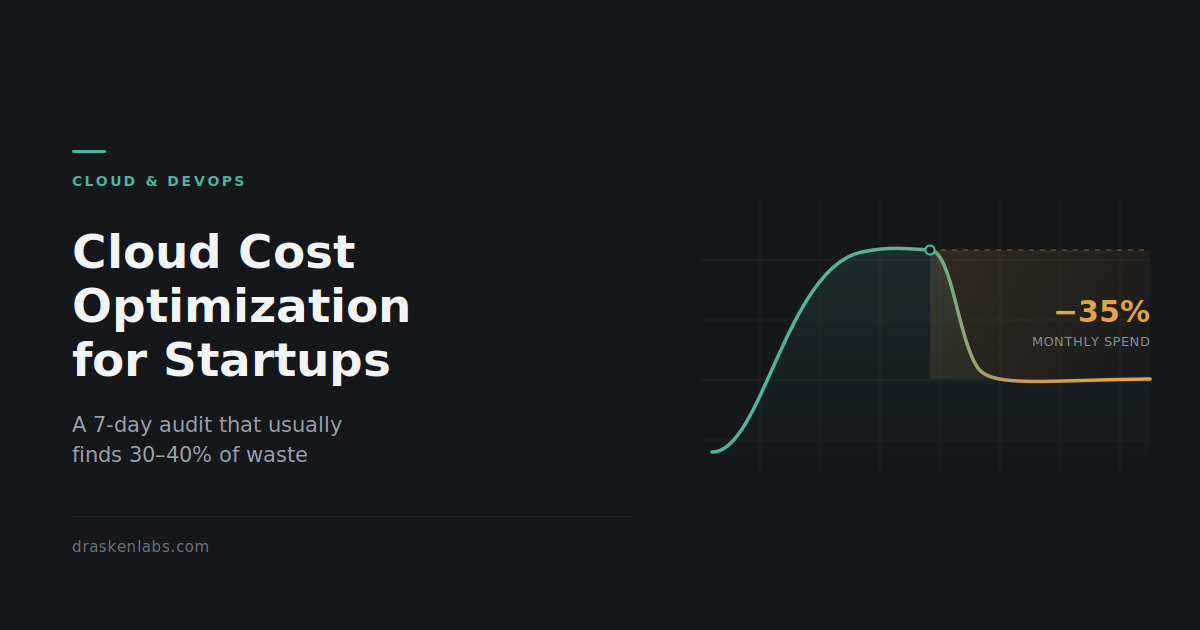
  • Cloud Cost Optimization for Indian Startups: A 7-Day Audit That Usually Finds 30–40%

    Cloud Cost Optimization for Indian Startups: A 7-Day Audit That Usually Finds 30–40%

    Every founder we talk to has the same story about their cloud bill. It was fine, then it wasn’t, and nobody can point at the exact month it stopped being fine.

    Cloud cost optimization gets treated as a finance problem when the invoice arrives. It’s an engineering problem that started months earlier. The industry number is that companies waste roughly a third of their cloud spend. The industry number is that companies waste roughly a third of their cloud spend. That figure gets repeated so often it has stopped meaning anything, so here it is in rupees instead. A Series A SaaS company running ₹8,00,000 a month on AWS is probably burning ₹2,40,000 to ₹3,20,000 of that on infrastructure nobody uses, nobody monitors, and nobody would miss. Over a year that is close to ₹35,00,000. That is two senior engineers, or eighteen months of runway extension, sitting inside a billing console.

    The uncomfortable part is that this is almost never an engineering skill problem. It is a sequencing problem. Infrastructure gets provisioned during a launch crunch, when the only thing that matters is that the thing works. Nobody comes back. The bill compounds quietly, and by the time someone notices, the architecture has grown around the waste and touching it feels risky.

    What follows is the audit we actually run at the start of a cloud and DevOps engagement. It is ordered deliberately. Most cost optimization guides start with Reserved Instances and Savings Plans, which is exactly backwards. Commitment discounts are the last step, not the first, and we will get to why.

    Day 1: Get visibility before you touch anything

    You cannot optimize what you cannot attribute. Before any changes, you need to be able to answer one question: which team, service, or environment is responsible for each line on the bill?

    On AWS, enable Cost Explorer if it isn’t already on. Expect a 24-hour delay before data populates on first activation, so do this before anything else. Then enable Cost and Usage Reports (CUR) delivered to S3, and query them with Athena. Cost Explorer is fine for eyeballing trends; CUR is where you find the truth.

    On GCP, set up billing export to BigQuery. On Azure, use Cost Management exports.

    Then the part everyone skips: tagging. Without cost allocation tags, your bill is one large undifferentiated number. Define a minimal, enforced tag schema, four or five keys at most:

    • env (prod / staging / dev)
    • service (the application or team that owns it)
    • owner (an actual human or team, not “platform”)
    • cost-center (if finance needs it)

    Enforce it in Terraform with default_tags at the provider level, so new resources cannot be created untagged. Retroactive tagging is a slog, but a one-time slog. Untagged resources are where money hides.

    Set your baseline here: total spend for the last three months, grouped by service. Take a screenshot. You will want it later when someone asks what the work achieved.

    Day 2: Delete the zombies

    This is the highest-return, lowest-risk day of the audit, and it usually pays for the whole exercise.

    Zombie resources are things that are running, billing, and attached to nothing. Common ones:

    • Unattached EBS volumes. Instances get terminated; volumes often survive them. You are paying full price for disks nobody can read.
    • Old EBS snapshots. Snapshot on every deploy with no lifecycle policy, and after two years you have thousands.
    • Idle load balancers. An ALB with zero healthy targets still bills the hourly charge.
    • Unassociated Elastic IPs. Worth flagging specifically: since February 2024, AWS charges for all public IPv4 addresses, not just idle ones, at roughly $0.005 per hour each. That is about ₹300 per address per month. Across a sprawling account with hundreds of addresses, this became a real line item overnight and most teams never adjusted.
    • Orphaned NAT Gateways. More on these tomorrow, because they deserve their own conversation.
    • Stopped instances with attached storage. The compute is free; the disk is not.
    • Abandoned dev environments. Someone spun up a full staging stack for a demo in 2024. It is still there.

    Run through Trusted Advisor’s cost optimization checks as a starting point, but do not stop there. Trusted Advisor is conservative and misses a lot.

    Nothing on this list should require an architecture discussion. If a resource is genuinely orphaned, delete it. Take a snapshot first if you’re nervous, then set a calendar reminder to delete the snapshot in 30 days.

    Day 3: Right-size compute, and question the instance family

    Right-sizing has a bad reputation because people do it badly: they look at average CPU, see 12%, and halve the instance. Then something falls over during a traffic spike and the whole exercise gets abandoned.

    Do it properly. Look at p95 and p99 utilization over at least 30 days, not averages, and look at memory alongside CPU. Many workloads that look CPU-idle are memory-constrained, and downsizing them is how you cause an incident.

    Two changes usually deliver more than raw downsizing:

    Move to ARM. On AWS, Graviton instances offer roughly 20% better price-performance than equivalent x86 for most standard workloads. If you are running containerized Node, Python, Go, or JVM services, the migration is often just a multi-architecture image build. GCP has Tau/Axion; Azure has Cobalt. This is one of the few optimizations where you get a discount for doing nothing to your architecture.

    Move gp2 volumes to gp3. gp3 is around 20% cheaper per GB and decouples IOPS from volume size, giving you 3,000 baseline IOPS regardless. On gp2, teams routinely over-provision disk size purely to buy IOPS. This is a live migration on most volume types, and it is close to free money.

    Day 4: The network bill nobody reads

    Data transfer is the single most under-audited line on a cloud bill, because it is invisible in architecture diagrams. Three patterns account for most of it.

    NAT Gateway processing charges. A NAT Gateway costs roughly $0.045 per hour to run plus $0.045 per GB processed. That per-GB charge is the problem. If your private-subnet services pull container images, hit S3, or talk to DynamoDB, every byte goes through NAT and gets billed. We have seen NAT processing exceed the compute cost of the services behind it.

    The fix is usually VPC Gateway Endpoints for S3 and DynamoDB, which cost nothing and route that traffic off the NAT path entirely. This is often a single-digit-hour change that removes a five-figure annual cost. Interface Endpoints (PrivateLink) for other services do have an hourly charge, so those need a genuine per-service calculation, not a blanket rollout.

    Cross-AZ traffic. AWS bills roughly $0.01 per GB in each direction for traffic between availability zones, so ₹ per GB round-trip. Chatty microservices spread randomly across three AZs, or an application layer talking to a database replica in another AZ, generate this constantly. Topology-aware routing in Kubernetes and AZ-aware service placement fix most of it. Note the tension: you are trading some cost against availability, so this is an architecture decision, not a cleanup task.

    Egress to the internet. Serve static assets and media through a CDN rather than directly from origin. Cloudflare and CloudFront both change the economics substantially at volume.

    Day 5: Storage tiers and the CloudWatch Logs surprise

    Storage feels cheap per GB, which is exactly why it grows unchecked.

    Object storage lifecycle policies. S3 Standard to Infrequent Access to Glacier, based on actual access patterns. S3 Intelligent-Tiering handles this automatically and is a good default for large objects, but read the fine print: it charges a small monitoring fee per object per month. For a bucket with tens of millions of tiny files, that monitoring fee can exceed the savings. Intelligent-Tiering suits fewer, larger objects.

    Log retention. This is the one that surprises people. CloudWatch Logs bills around $0.50 per GB ingested, before storage. A verbose debug logger left on in production, or an application logging every health check, can quietly become one of your top five line items. Audit what you are actually ingesting, drop health-check and heartbeat noise at the agent, and set explicit retention on every log group. New log groups default to “never expire,” which is almost never what you want.

    If you are running a proper observability stack, this is also where you decide what belongs in metrics versus logs. Most of what teams log should have been a counter.

    Day 6: Non-production environments are running 24/7 for no reason

    There are 168 hours in a week. Your development and staging environments are genuinely needed for perhaps 50 of them.

    Scheduled shutdown of non-production environments outside working hours is a 60–70% reduction on that portion of the bill, and it is one of the least controversial changes you can make. Instance Scheduler on AWS, or a scheduled GitHub Action calling Terraform, both work. For Kubernetes, scale non-prod node groups to zero overnight.

    Two things make this stick:

    • Make it default-off, opt-in-on. An engineer who needs staging at 11pm can start it with one command. If the default is “always running,” nobody turns it off.
    • Use Spot for non-production. Interruption is annoying in prod and irrelevant in staging. Spot pricing runs 60–90% below on-demand. For CI runners, batch jobs, and stateless dev workloads, there is no good reason not to.

    Day 7: Now buy commitments

    Only now, after six days of removing waste, should you look at Savings Plans and Reserved Instances.

    The reason for the ordering is straightforward. A commitment locks in one or three years of spend at a discount. If you commit before cleaning up, you lock in your waste at a discount, and you have made it harder to remove later, because your committed spend floor now depends on running resources you no longer need.

    Once your baseline is honest:

    • Compute Savings Plans are the flexible option, covering EC2, Fargate, and Lambda across instance families and regions. Lower discount than a strict RI, far lower regret risk.
    • Start conservative. Commit to your reliable floor, roughly your minimum sustained usage, not your average. Savings Plans stack, so you can add more later. You cannot easily unwind an over-commitment.
    • One year, no upfront is the sensible default for a startup whose architecture will change. Three-year all-upfront gets you the headline discount rates, but only makes sense if you are genuinely confident about your compute shape three years out. Most Series A companies are not.
    • Check India-specific billing. If you are invoiced through AWS India (AISPL) in INR, your GST treatment and credit application differ from a direct AWS Inc account. Worth a conversation with your finance team before committing, since it affects the real post-tax saving.

    The Kubernetes question

    Somewhere in this process, someone will suggest that Kubernetes will fix the cost problem. Sometimes that is right. Often it is not.

    Kubernetes improves bin-packing, and with Karpenter or Cluster Autoscaler it genuinely reduces waste on workloads with variable, bursty demand across many services. If you are running twenty-plus services with uneven load, it earns its place.

    If you are running four services on six instances, Kubernetes adds a control plane charge, a meaningful operational burden, and a new category of things that can page you at 3am, in exchange for savings you could have gotten from right-sizing. ECS Fargate, Cloud Run, or plain autoscaling groups are frequently the cheaper total-cost answer once you price in engineering time.

    Our position on this is unchanged: use Kubernetes when it earns its complexity, not before. The same applies to service meshes, multi-region active-active, and most of the rest of the cloud-native catalogue. If you want a longer conversation about where that line sits for your architecture, that is the substance of most of our platform engineering work.

    Making cloud cost optimization stick

    The failure mode of every cost optimization project is that the bill drops 35% in month one and climbs back over the following year. Cleanup is a project; cost discipline is a system. Three guardrails do most of the work:

    1. Budgets and anomaly detection. Set a monthly budget with alerts at 50%, 80%, and 100%. Enable cost anomaly detection so a runaway resource surfaces in days, not at the end of the billing cycle.
    2. Tag enforcement in code. Untagged resources should fail the pipeline, not get cleaned up in a quarterly sweep. Enforce it in Terraform and in policy checks.
    3. Cost as a review item. A ten-minute monthly review of the top five line items, owned by a named person, catches almost everything. Cost regressions behave like performance regressions: cheap to catch early, expensive to catch late.

    Add cost visibility to the same dashboards your team already looks at. Spend that is only visible in a billing console nobody opens is spend that will drift.

    What a cloud cost optimization engagement looks like

    For most teams, this is a two-to-three week piece of work: a week of audit and quick wins, then a week or two implementing the changes that need testing. The zombie cleanup and network fixes usually deliver the majority of the savings, and they carry the least risk.

    We have run this on production systems where the outcome was a 40% infrastructure cost reduction with zero production incidents during the migration, alongside the GitOps and delivery work described in this case study. Cost optimization is part of how we build, not a separate upsell.

    If your cloud bill has stopped making sense, tell us what you’re running. You will hear back from a senior engineer within one business day with an actual assessment, not a discovery call.

    How much can we realistically save on cloud costs?

    For a team that has never run a structured audit, 25–40% is a normal outcome, and most of it comes from removing genuinely unused resources rather than from clever architecture. Teams that already practise FinOps typically find 5–15%.

    Will optimizing cloud costs make our system less reliable?

    The first two-thirds of this audit removes resources that serve no traffic, which carries no reliability cost. Risk enters at right-sizing and cross-AZ consolidation, which is why those changes need utilization data and staged rollout rather than a spreadsheet.

    Should we move off the cloud to reduce costs?

    Rarely, and almost never at startup scale. Repatriation makes sense for large, stable, predictable workloads where the hardware pays for itself. If your bill is growing because of waste rather than scale, moving that waste to your own servers does not fix it.

    How long does a cloud cost audit take?

    The assessment itself takes about a week once billing data access is in place. Implementation depends on how much needs testing, but most teams see the first savings land within two weeks.

    Do we need Kubernetes to optimize cloud costs?

    No. Kubernetes helps with bin-packing at scale, but for smaller service counts it usually adds more operational cost than it saves. Right-sizing, scheduling, and network fixes deliver more for most teams.

  • Your WhatsApp bill changes on October 1. Here’s the engineering audit to run first.

    Your WhatsApp bill changes on October 1. Here’s the engineering audit to run first.

    If you run the WhatsApp Business Platform, your WhatsApp API costs change on October 1, 2026. Two things that are free today stop being free: free-form service replies sent inside the open 24-hour customer service window, and utility templates sent in reply to a user inside that same window.

    There is no shortage of articles explaining that. Almost all of them are written by messaging platforms, and almost all of them end at the rate card.

    We build and run messaging infrastructure, so we look at this differently. Meta’s rate is fixed and non-negotiable. Your message count is not. That is the only variable you control, and nobody selling you per-message credits has an incentive to help you reduce it.

    This post is the audit we run for clients: how to calculate your real exposure, the four architecture patterns that quietly inflate it, and what to instrument before the deadline so you find out in a dashboard rather than an invoice.

    First, calculate your actual WhatsApp API costs

    Before re-architecting anything, get a number. A lot of the alarm around this change is out of proportion to the money involved, and you should know which side you’re on before spending engineering time.

    The India rate card puts utility and authentication messages at roughly ₹0.115 per message, with marketing templates far higher at around ₹0.86 after the January 2026 increase. Service messages are expected to land at the utility and authentication rate. Add 18% GST, and add whatever your provider charges on top.

    Run the numbers on your own WhatsApp API costs before you spend engineering time:

    A small support operation. 6,000 inbound conversations a month, averaging 4 agent replies each. That’s 24,000 service messages, or roughly ₹2,760 plus GST at Meta’s rate. Under ₹3,300 a month. This is not a project. Change nothing, absorb it, move on.

    A support-heavy or bot-driven operation. 30,000 conversations a month, averaging 20 replies each because a chatbot handles first-line triage. That’s 600,000 service messages — around ₹69,000 plus GST at Meta’s rate, close to ₹10 lakh a year. And because service messages get no volume discount, this scales linearly forever. This one is worth a sprint.

    The gap between those two numbers is not traffic volume. It’s messages per resolution. That is the metric this change actually taxes, and it is an engineering metric, not a pricing one.

    Two things to check before you trust your estimate:

    1. Your provider’s markup, not just Meta’s rate. Meta’s per-message charge is one layer; your platform fee and per-message markup is another. For some businesses the markup is the larger number. If you can’t see the two separately on your invoice, that’s the first thing to fix. Our WA Console pricing page breaks these out deliberately for this reason.
    2. The 72-hour free entry point still exists. Conversations opened from a Click-to-WhatsApp ad or a Facebook or Instagram CTA keep their free entry window. If a meaningful share of your inbound comes from paid social, your exposure is smaller than a naive count suggests. Segment by entry point before you model.

    Almost all avoidable WhatsApp API costs fall into four patterns.

    The four patterns that make this expensive

    Once you know the change matters for you, the work is reducing billable messages per resolved conversation — without degrading the experience. In practice, almost all of the waste we see falls into four patterns.

    1. The multi-bubble reply

    Chatbots and agent tooling frequently split one logical response across three or four message bubbles because it reads more naturally in a chat UI. Under the old model, inside an open window, this cost nothing. From October 1, a four-bubble reply costs four times a one-bubble reply.

    Fix: compose at the response layer, not the send layer. Buffer outbound fragments for a short window — 400 to 800ms is usually enough — and flush them as a single message. This is a small change in your send adapter and it can remove 40 to 60% of outbound volume in bot-heavy flows on its own.

    2. The acknowledgement message

    “Got it, let me check that for you.” “One moment please.” “Thanks for confirming!” These exist because of latency, not because of user value. They were free filler; now they are line items.

    Fix: most of them can be deleted outright. Where the latency is real, use WhatsApp’s typing indicator rather than a message, or fold the acknowledgement into the front of the substantive reply that follows.

    3. The utility template that duplicates a service reply

    A common flow: the customer asks about their order, an agent replies with the status in free-form text, and the system also fires an order-status utility template. Before October 1, both were free inside the window. After, you pay for both, for the same information.

    Fix: this is a deduplication problem. Suppress automated utility sends when a human or bot has already answered on the same intent inside the same window. It requires your template dispatcher to be aware of conversation state, which most integrations built against the raw Cloud API are not.

    4. The re-engagement nudge

    “Are you still there?” and “Just following up on this” loops, particularly in abandoned-cart and lead-qualification flows, can send several messages into conversations that were never going to convert.

    Fix: measure conversion by nudge index. In most funnels we’ve instrumented, the second follow-up converts at a fraction of the first and the third converts near zero. Cut the tail. This usually improves the numbers on both sides of the ledger.

    What to instrument before September 30

    The reason this change catches teams out is not that the rate is high. It’s that most integrations have no visibility into WhatsApp API costs at all, so the first signal is a monthly invoice that is 3x expectations with no way to attribute it.

    You have roughly four weeks. Instrument this now, while service messages are still free, so you have a clean baseline to compare against.

    Log these fields on every outbound message:

    • message_category — marketing, utility, authentication, service, or Meta Business Agent
    • window_state — whether the 24-hour customer service window was open at send time
    • entry_point — organic, Click-to-WhatsApp ad, or Page CTA, to identify free-window conversations
    • conversation_id — a stable identifier so you can aggregate cost per conversation
    • origin — bot, human agent, or automation, so you know which system is spending
    • resolution_outcome — resolved, escalated, or abandoned

    Then build three views:

    1. Messages per resolved conversation, broken down by flow. This is your primary cost driver and your primary optimisation target. Track it as a trend, not a snapshot.
    2. Cost attribution by origin. If your chatbot is responsible for 80% of outbound volume, that’s where the sprint goes.
    3. A monthly spend budget with alerting. Treat it exactly like an SLO — set a threshold, alert on burn rate, page someone when projected month-end spend exceeds it. This is standard practice for cloud spend and almost nobody applies it to messaging spend.

    If you already run Prometheus and Grafana, this is a small amount of work — emit a counter per send, labelled by the dimensions above, and the dashboards fall out of it. If you don’t have that foundation, it’s the same instrumentation problem we solve in our observability practice, just pointed at a messaging bill instead of a service.

    One caution on Meta Business Agent: if you use Meta’s built-in AI, it moved to token-based billing on August 1, 2026 at $2.00 per million tokens globally. That is a separate category with separate economics — don’t blend it into your per-message model, or your forecast will be wrong in both directions.

    What not to do

    Two failure modes are worth naming, because we’ve seen both.

    Don’t degrade support to save ₹0.115. If a customer needs three messages to get a correct answer, send three messages. The optimisation target is redundant messages, not necessary ones. A support experience that gets worse to save five figures a year is a bad trade for almost any business with real customer lifetime value.

    Don’t rebuild your stack on a rate that hasn’t been confirmed. Meta’s published pricing calendar committed to announcing the final country-level rates ahead of the October launch. Model your exposure as a range, not a point estimate, and confirm against Meta’s official pricing documentation and your provider before committing budget. The changes since 2024 have come roughly quarterly — build the assumption of ongoing revision into your model rather than treating any rate card as permanent.

    The short version

    • Calculate exposure first. For a lot of businesses this is noise, and the honest answer is to do nothing.
    • If your messages-per-resolution is high, WhatsApp API costs scale linearly with no discount.
    • Almost all the savings come from four patterns: multi-bubble replies, acknowledgement filler, duplicated utility sends, and re-engagement nudges.
    • Instrument before September 30 so you have a pre-change baseline.
    • Treat messaging spend the way you treat cloud spend: budgeted, attributed, and alerted on.

    What exactly changes on October 1, 2026?

    Free-form service replies sent inside the open 24-hour customer service window become billable per message, and utility templates sent in response to a user inside that window lose the free status they held from July 2025. Service messages are priced at the same rate as utility and authentication templates in the same country, with no volume discounts.

    Does this affect the free WhatsApp Business app?

    No. The change applies to the WhatsApp Business Platform — the API — not the consumer WhatsApp app or the free WhatsApp Business app.

    Are incoming customer messages charged?

    No. Messages customers send to you do not create a Meta message charge. The change is on the outbound side.

    Is the 72-hour free entry point window going away?

    No. Conversations opened from a Click-to-WhatsApp ad or a Facebook or Instagram CTA keep their free entry point window.

    What are WhatsApp API costs for an Indian business?

    It depends on your message mix and volume. India’s utility and authentication rate has been around ₹0.115 per message, and service messages are expected to match it, plus 18% GST and your provider’s fees. Multiply by your monthly outbound message count inside the service window — not your conversation count — to get a realistic figure.

    How is Meta Business Agent billed?

    Separately. It moved to token-based billing on August 1, 2026, at $2.00 per million tokens globally. Third-party AI replies delivered through the API are treated as service messages instead, so which AI you use changes which pricing model applies.

    Running WhatsApp at volume and unsure what October looks like for you? Talk to a senior engineer — we’ll review your message flows and give you a real number, not a rate card. Or see how WA Console handles per-message cost attribution out of the box.

  • Custom Software Development Services: Everything Businesses Need to Know Before Hiring a Development Company (2026 Guide)

    Custom Software Development Services: Everything Businesses Need to Know Before Hiring a Development Company (2026 Guide)

    Every business reaches a point where spreadsheets, disconnected applications, and generic software begin slowing growth instead of enabling it. Whether you’re managing customers, inventory, operations, finance, or internal workflows, off-the-shelf software often forces businesses to adapt their processes to fit the software—not the other way around.

    Custom software development changes that equation.

    Instead of compromising your business operations, custom software is designed specifically around your workflows, business goals, customers, and future growth plans.

    In this guide, you’ll learn what custom software development is, who needs it, how the development process works, how much it typically costs, and what to look for when choosing a software development partner.

    What Is Custom Software Development?

    Custom software development is the process of designing, building, deploying, and maintaining software tailored specifically to the requirements of a business or organization.

    Unlike ready-made software that serves a broad audience, custom software is built to solve unique business challenges.

    Examples include:

    • Customer Relationship Management (CRM) systems
    • Enterprise Resource Planning (ERP) platforms
    • Inventory Management Systems
    • Warehouse Management Software
    • Healthcare Management Platforms
    • Learning Management Systems
    • Booking Platforms
    • Logistics Management Systems
    • Manufacturing Software
    • Vendor Portals
    • Customer Portals
    • Mobile Applications
    • SaaS Platforms

    Every feature is developed based on your business requirements rather than unnecessary functionality included in generic products.

    Why Businesses Choose Custom Software

    Businesses invest in custom software because it provides long-term operational advantages.

    Some of the biggest benefits include:

    • Increased productivity
    • Automation of repetitive tasks
    • Better customer experience
    • Improved reporting and analytics
    • Integration with existing systems
    • Enhanced security
    • Scalability as the business grows
    • Lower long-term operational costs

    Instead of paying for multiple disconnected subscriptions, organizations can centralize operations within a single platform.

    Signs Your Business Needs Custom Software

    Many companies continue using spreadsheets and multiple SaaS products long after they’ve outgrown them.

    You may benefit from custom software if:

    • Employees manually copy data between systems
    • Teams rely heavily on Excel spreadsheets
    • Existing software cannot meet your workflow requirements
    • Multiple software subscriptions are increasing costs
    • Reporting requires manual effort
    • Customers experience delays due to inefficient processes
    • Your business requires integrations unavailable in existing software
    • Data is scattered across different applications

    These are clear indicators that customized software can improve operational efficiency.

    Types of Custom Software Solutions

    Custom software can be developed for virtually any business function.

    Common solutions include:

    Customer Relationship Management (CRM)

    Manage leads, customers, quotations, sales pipelines, support tickets, and follow-ups in one centralized platform.

    Enterprise Resource Planning (ERP)

    Integrate finance, HR, inventory, procurement, manufacturing, and operations into a unified system.

    Mobile Applications

    Native and cross-platform mobile applications for Android and iOS with seamless backend integration.

    Customer Portals

    Provide customers with secure access to orders, invoices, reports, documents, and support requests.

    Inventory Management

    Track stock levels, warehouses, suppliers, purchase orders, and product movement in real time.

    Workflow Automation

    Automate approvals, notifications, document generation, invoicing, and repetitive business processes.


    Custom Software Development Process

    A successful software project follows a structured development lifecycle.

    1. Discovery

    Business goals, challenges, user requirements, and project scope are identified.

    2. Planning

    Technical architecture, timelines, milestones, and technology stack are finalized.

    3. UI/UX Design

    Interactive wireframes and user-friendly interfaces are designed before development begins.

    4. Development

    Frontend, backend, APIs, databases, and integrations are built using modern development practices.

    5. Quality Assurance

    Every feature is tested for functionality, security, performance, and compatibility.

    6. Deployment

    The application is deployed to cloud infrastructure or on-premise servers.

    7. Ongoing Support

    Continuous improvements, monitoring, updates, and maintenance ensure long-term reliability.


    How Much Does Custom Software Development Cost?

    The cost depends on several factors, including project complexity, integrations, number of users, security requirements, and desired features.

    Typical ranges include:

    Project TypeEstimated Timeline
    MVP2–3 Months
    Business Portal3–6 Months
    CRM Platform4–8 Months
    ERP System6–12 Months
    Enterprise Platform9–18 Months

    Rather than focusing only on development cost, businesses should evaluate the long-term return on investment through improved efficiency, reduced manual work, and increased productivity.


    How to Choose the Right Software Development Company

    Selecting the right development partner can significantly influence project success.

    Consider the following:

    • Experience with similar projects
    • Transparent development process
    • Strong communication
    • Scalable architecture
    • Security best practices
    • Cloud deployment expertise
    • Post-launch support
    • Clear project documentation

    A reliable software partner should understand your business objectives—not just your technical requirements.


    Frequently Asked Questions

    Is custom software better than off-the-shelf software?

    Custom software is ideal when your business processes are unique or when existing software cannot efficiently support your operations.

    How long does custom software development take?

    Depending on complexity, projects typically range from two months to over a year.

    Can custom software integrate with existing systems?

    Yes. Modern software can integrate with payment gateways, CRMs, ERPs, accounting platforms, cloud services, and third-party APIs.

    Can mobile apps be developed alongside web applications?

    Yes. Many businesses build web platforms and mobile applications simultaneously to provide a seamless experience across devices.


    Conclusion

    Custom software is more than a technology investment—it’s a strategic business asset. By aligning software with your unique processes, you can streamline operations, improve customer experiences, reduce inefficiencies, and create a platform that scales with your business.

    Whether you’re planning a custom CRM, ERP, customer portal, SaaS platform, or mobile application, investing in the right development approach today can deliver measurable value for years to come.


    Ready to Build Custom Software for Your Business?

    If you’re looking to develop a secure, scalable, and high-performance software solution tailored to your business goals, our team can help. We specialize in custom software development, web applications, mobile app development, API integrations, cloud-native solutions, and business automation platforms.

    Contact us today for a free consultation and discover how custom software can accelerate your business growth.